
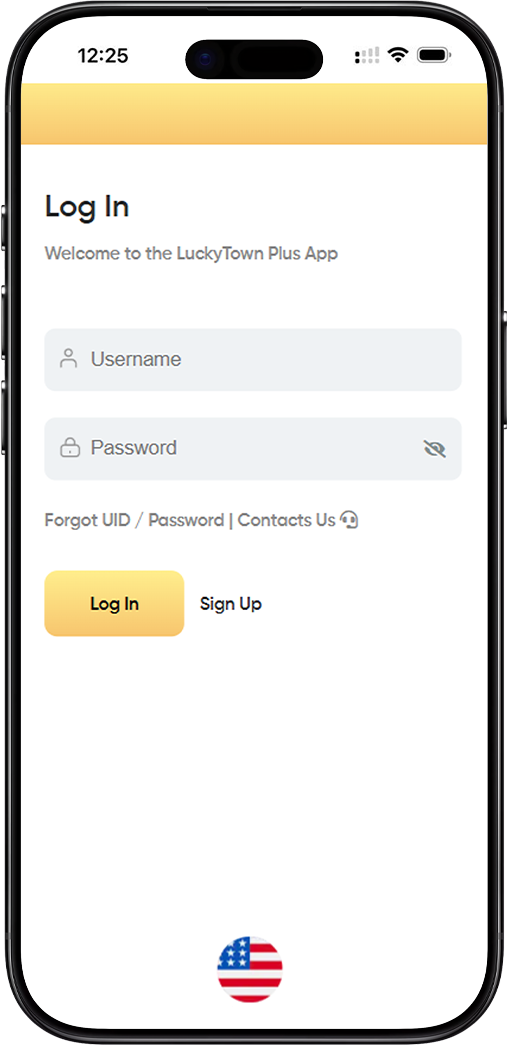
Welcome to the LUCKYTOWNPLUS App. The login page is your gateway to managing your account, viewing your activity, and connecting with the LUCKYTOWNPLUS community. Our people-first design ensures that signing in is simple, fast, and secure every time.
Step-by-Step Guide to Logging In
Step 1: Enter Your Username
In the "Username" field, type the username you created during LUCKYTOWNPLUS registration. Remember that usernames are case-sensitive and must match exactly what you registered. If you're unsure, check any welcome emails or account confirmation messages from LUCKYTOWNPLUS.
Step 2: Enter Your Password
Type your password in the "Password" field. Passwords are case-sensitive and must be entered exactly as created. The field will mask your input with dots or asterisks to protect your privacy from anyone nearby.
Password Visibility Option
Some browsers and devices offer a "show password" option (often represented by an eye icon). You can use this temporarily to check that you've typed your password correctly, especially on personal devices.
Step 3: Click "Log In"
After entering your credentials, click the green "Log In" button. The system will verify your information and grant you access to your LUCKYTOWNPLUS account dashboard. This process typically takes just a few seconds.
What Happens After Login
Upon successful login, you'll be redirected to your personal dashboard where you can view your profile, update settings, and access all LUCKYTOWNPLUS features. Your login session will remain active for a period of time for your convenience.
Having Trouble Logging In?
Forgot UID / Password – Recovery Options
If you can't remember your username or password, click the "Forgot UID / Password" link located below the login fields. This will guide you through the recovery process using your registered email or Malaysia phone number.
Username Recovery Process
To recover your username, you'll need to provide the email address or phone number associated with your LUCKYTOWNPLUS account. The system will send your username to your registered contact method within minutes.
Password Reset Steps
For password resets, you'll receive a secure link via SMS or email. Click the link to create a new password that meets the security requirements (minimum 8 characters, no spaces). Choose something strong but memorable.
Contact Us – Getting Direct Support
If the self-service recovery options don't resolve your issue, click the "Contacts Us" link. This will connect you with the LUCKYTOWNPLUS support team, who can assist with account access problems, verification issues, or technical difficulties.
What to Include in Your Support Request
When contacting support, include your registered username (if known), the email or phone linked to your account, and a clear description of the issue. This helps the LUCKYTOWNPLUS team resolve your request faster.
New to LUCKYTOWNPLUS?
Create Your Account via "Sign Up"
If you don't have an account yet, click the "Sign Up" button next to the login options. This will take you to the LUCKYTOWNPLUS registration page at https://luckytownplus0.com/register, where you can create a new account with your Malaysia phone number.
Registration Benefits
Signing up for LUCKYTOWNPLUS gives you access to all community features, secure profile management, and the peace of mind that comes with phone-verified account protection. Registration takes just minutes.
Login Security Best Practices
Keep Your Credentials Safe
Your LUCKYTOWNPLUS username and password are the keys to your account. Never share them with anyone, and avoid using the same password across multiple sites. Consider using a password manager to generate and store strong, unique passwords.
Recognizing Phishing Attempts
LUCKYTOWNPLUS will never ask for your password via email, SMS, or phone call. If you receive such a request, do not respond and report it to the LUCKYTOWNPLUS support team immediately. Always access login through the official app or website.
Device and Browser Security
When logging in on shared or public computers, always ensure you log out completely and close the browser window. Avoid saving your password on devices that others can access. For personal devices, keeping your browser updated adds an extra layer of security.
Frequently Asked Questions About LUCKYTOWNPLUS Login
Why Am I Seeing "Invalid Username or Password"?
This message appears when the credentials entered don't match our records. Double-check for typos, ensure Caps Lock is off, and verify you're using the correct username format (letters and numbers only). After multiple failed attempts, your account may be temporarily locked for security.
Can I Stay Logged In on My Device?
LUCKYTOWNPLUS offers a session persistence feature that keeps you logged in for a set period on trusted devices. However, for security reasons, you may be asked to re-enter your password periodically, especially after significant inactivity or from new locations.
What If I'm Locked Out of My Account?
After several unsuccessful login attempts, LUCKYTOWNPLUS automatically temporarily locks the account to prevent unauthorized access. Wait 15-30 minutes before trying again, or use the "Forgot UID / Password" option to reset your credentials immediately.
Account Recovery Timeframes
Most account recovery issues are resolved within minutes via self-service options. If you need to contact support, response times vary but the LUCKYTOWNPLUS team prioritizes login issues to get you back into your account as quickly as possible.
LUCKYTOWNPLUS Mobile App Login
Logging In on the Go
The LUCKYTOWNPLUS login experience is consistent across desktop and mobile devices. Whether accessing via browser or the dedicated app, you'll use the same username and password. The mobile interface is optimized for touch, making entry quick and convenient.
Mobile-Specific Features
On mobile devices, you may have additional login options like biometric authentication (fingerprint or face recognition) if your device supports it and you've enabled this feature in your LUCKYTOWNPLUS settings.
Ready to Access Your LUCKYTOWNPLUS Account?
Log in now to manage your profile, connect with the community, and enjoy all the secure features LUCKYTOWNPLUS has to offer. First time here? Sign up today – it only takes a minute.
Log In to LUCKYTOWNPLUS