
LUCKYTOWNPLUS now offers USDT (Tether) as a convenient deposit method for players who prefer cryptocurrency transactions. Using the TRC20 network, USDT deposits are fast, secure, and offer excellent conversion rates. LUCKYTOWNPLUS supports deposits from major platforms including Binance, Huobi, and others. Follow our step-by-step guide below to complete your USDT top up.
Step-by-Step Guide to USDT Top Up


Step 1: Access the "Me" Section
Log in to your LUCKYTOWNPLUS account. On the main page, locate and click the "Me" button in the bottom right corner. This opens your personal dashboard where you can manage your account and access financial transactions.
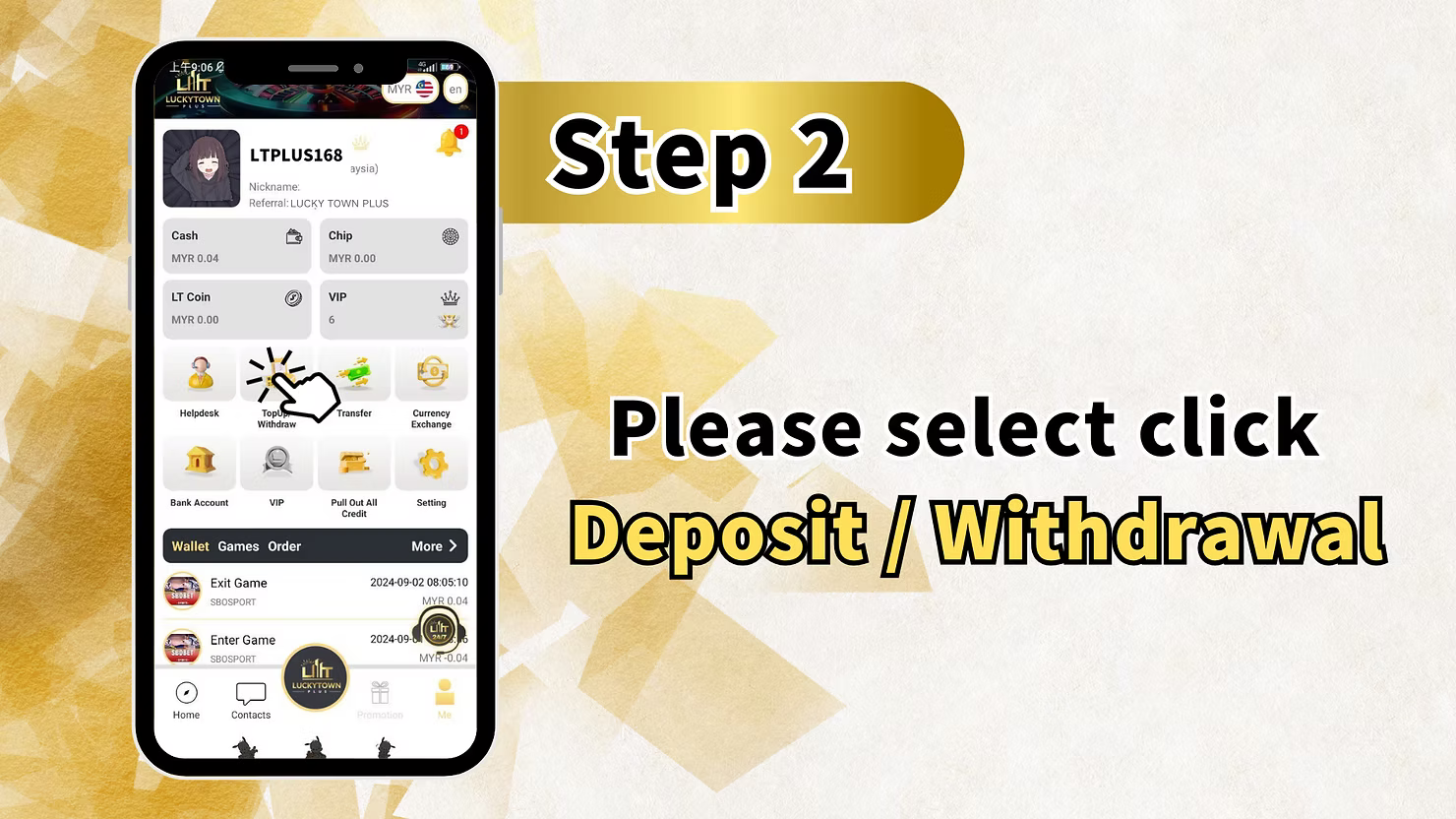
Step 2: Select "Deposit / Withdrawal"
From your "Me" dashboard, locate and click on "Deposit / Withdrawal" (also shown as "Top Up/Withdraw"). This will take you to the main financial transaction page.
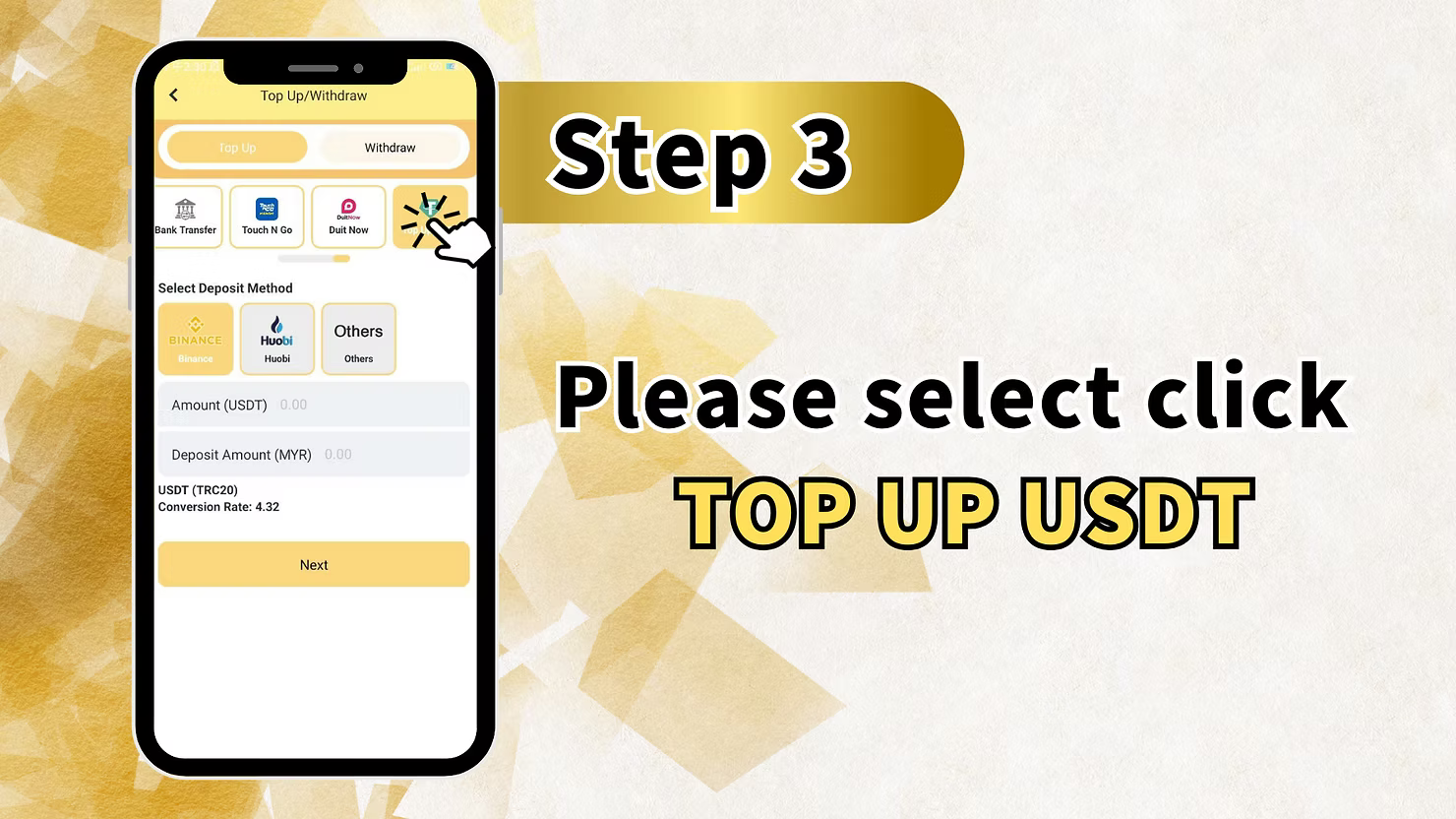
Step 3: Select USDT as Your Deposit Method
On the Top Up/Withdraw page, you will see various deposit options including Bank Transfer, Touch N Go, and Duit Now. For USDT deposits, look for the cryptocurrency options:
Available USDT Platforms
- BINANCE – Select this option if you are depositing from Binance exchange
- Huobi Huobi – Select this option if you are depositing from Huobi exchange
- Others – Select this option if you are using another cryptocurrency wallet or exchange
Enter Deposit Amount
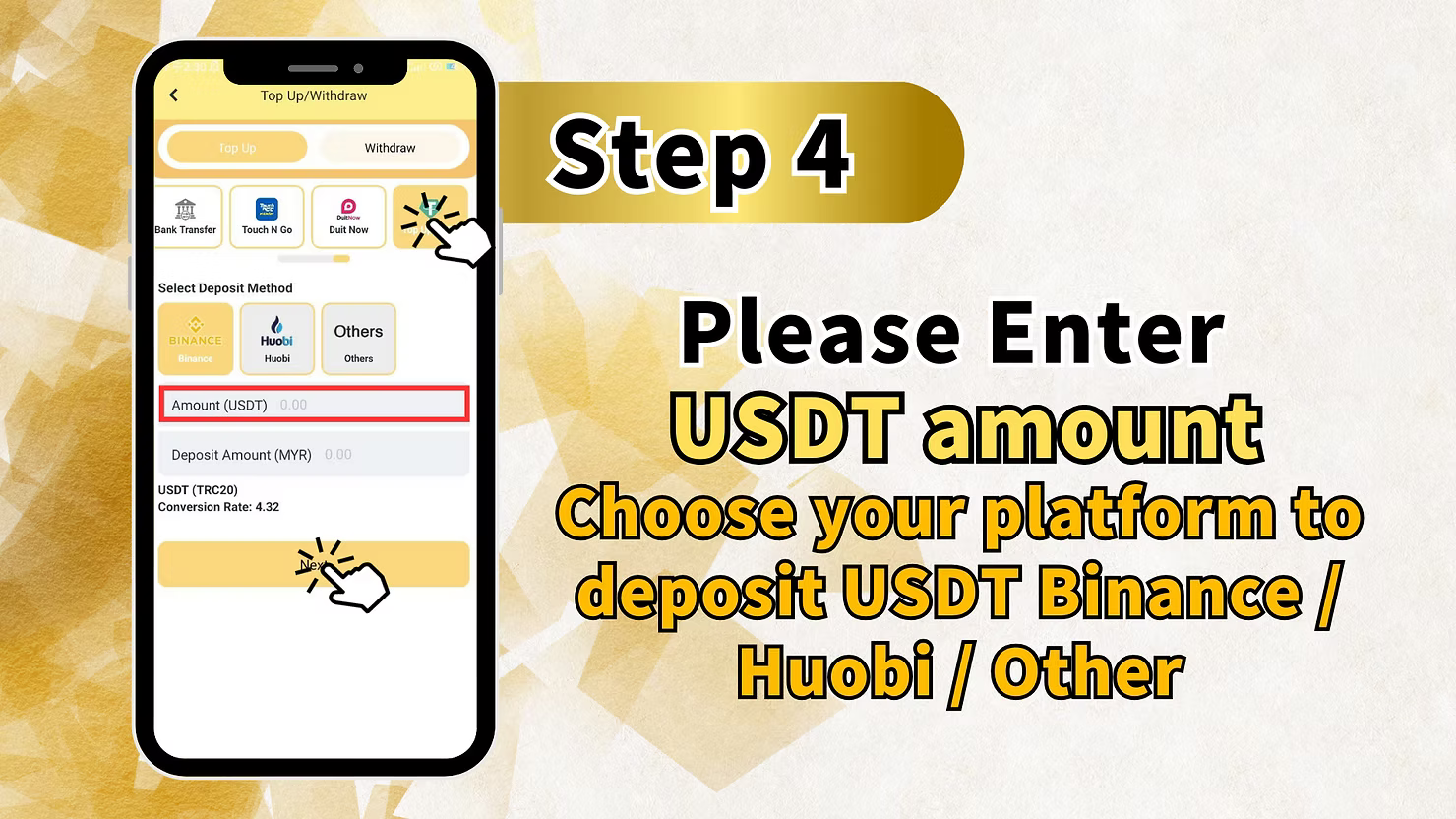
In the "Amount (USDT)" field, enter the amount of USDT you wish to deposit. The system will automatically calculate the equivalent in Malaysian Ringgit:
Conversion Rate Display
- Deposit Amount (MYR) – Shows the MYR equivalent of your USDT deposit
- USD/T (TRC20) – Indicates the network being used (TRC20)
- Conversion Rate: 4.32 – The current USDT to MYR conversion rate (example shows 4.32)
Complete Step 3
After entering your amount and confirming the conversion rate, click "Next" to proceed.
Step 4: Enter USDT Amount and Choose Platform
On the next screen, you will be prompted to:
Enter USDT Amount
"Please Enter USDT amount" – Confirm the amount you wish to deposit. Ensure it matches what you entered in Step 3.
Choose Your Platform
"Choose your platform to deposit USDT Binance / Huobi / Other" – Select the platform you will be using to send the USDT. This helps LUCKYTOWNPLUS match your incoming transaction.
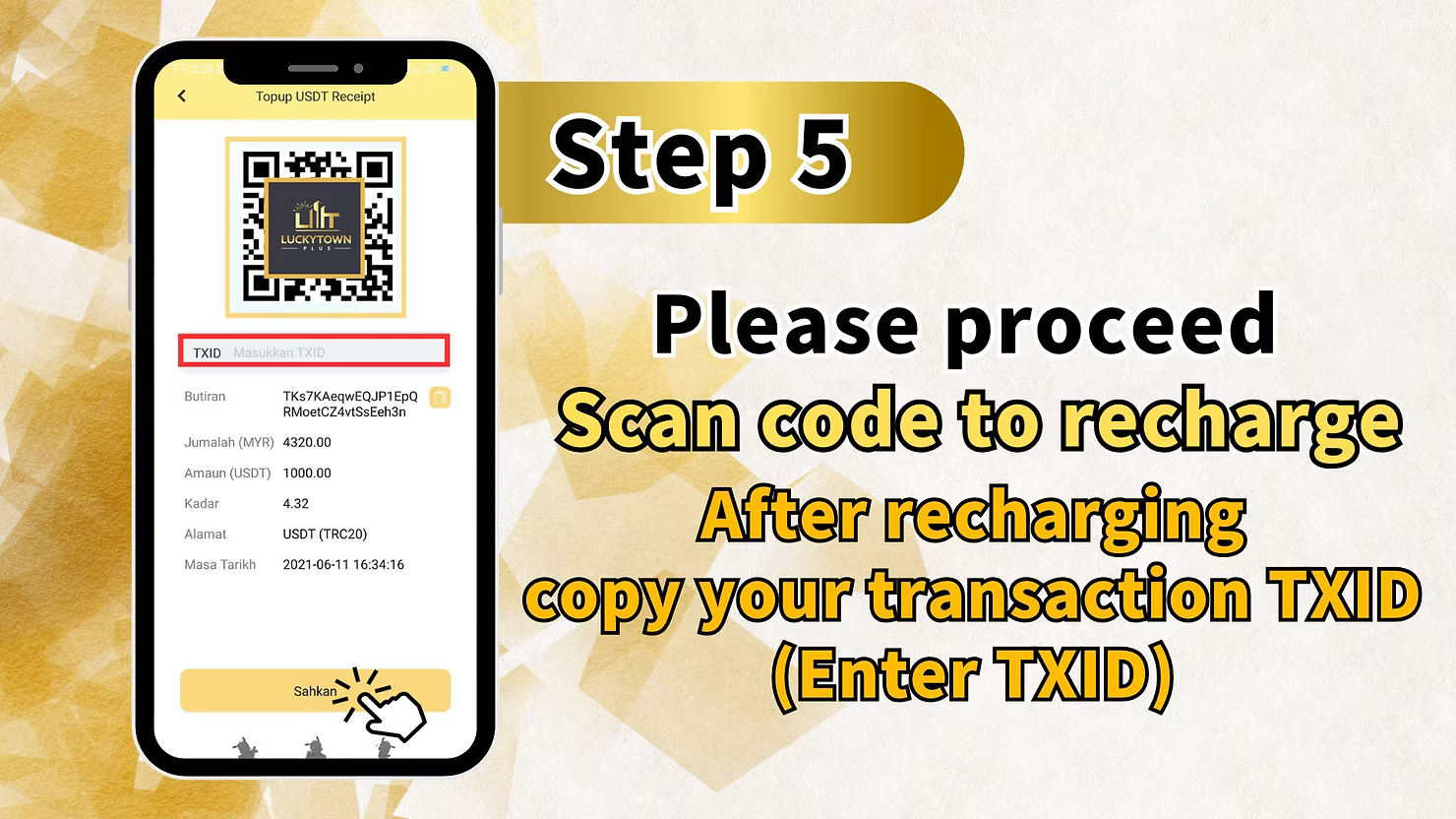
Step 5: Scan QR Code and Complete Payment
The system will display a payment screen titled "Topup USDT Receipt" with the following information:
QR Code for Payment
A QR code will be displayed for you to scan using your cryptocurrency wallet or exchange app. Scan this code to initiate the transfer.
Important: Copy Your Transaction TXID
"Please proceed Scan code to recharge After recharging copy your transaction TXID (Enter TXID)" – After completing the transfer in your wallet, you must copy the Transaction ID (TXID) and enter it in the provided field.
TXID Entry Field
The screen shows a field labeled "TXD" or "Masukkan TXID" where you should paste your transaction ID.
Transaction Details Display
The screen displays example transaction details for reference:
- Butiran / Details: TK9KAeqwEQJP1EpQ RMoetCZ4vtSsEeh3n (example data)
- Jumalah (MYR): 4320.00
- Amaun (USDT): 1000.00
- Kadar / Rate: 4.32
- Alamat / Address: USDT (TRC20)
- Masa Tarikh / Date Time: 2021-06-11 16:34:16
Submit Your Transaction
After pasting your TXID and confirming all details are correct, click the "Sahkan"(Confirm) button to submit your deposit for processing.
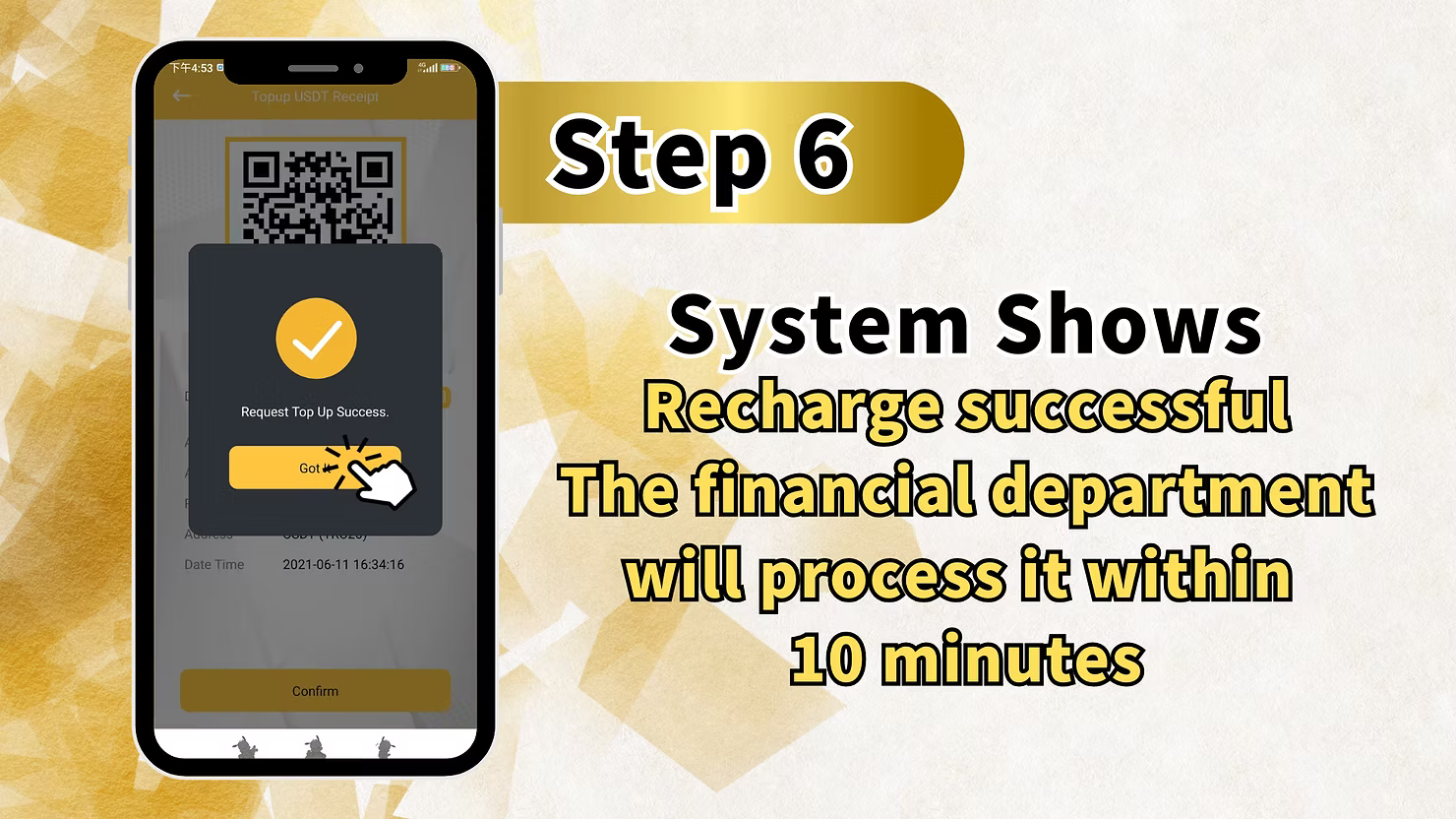
Step 6: Wait for Processing Confirmation
After submitting your TXID and confirming, you will see a confirmation message:
Processing Time
"System Shows Recharge successful The financial department will process it within 10 minutes" – Your USDT deposit will be verified and credited to your LUCKYTOWNPLUS account within 10 minutes.
Success Confirmation
You will see a success message similar to: "Request Top Up Success. Got ❤️ Date Time: 2021-06-11 16:34:16" – This confirms your deposit request has been received and is being processed.
Important Notes for USDT Top Up
Network Requirement: TRC20
LUCKYTOWNPLUS accepts USDT deposits via the TRC20 network. Ensure you select TRC20 when sending from your wallet or exchange. Sending via other networks (such as ERC20 or BEP20) may result in lost funds.
Conversion Rate
The example shows a conversion rate of 4.32 USDT to MYR. Actual rates may vary based on market conditions. The rate displayed at the time of your deposit will apply.
TXID Is Essential
You must copy and enter your Transaction ID (TXID) after completing the transfer. Without the TXID, the finance department cannot verify your deposit. Always save your TXID before closing your wallet app.
Processing Time
USDT deposits are typically processed within 10 minutes after TXID submission. During peak times, it may take slightly longer.
Supported Platforms
LUCKYTOWNPLUS supports USDT deposits from:
- Binance – World's largest cryptocurrency exchange
- Huobi – Major global cryptocurrency exchange
- Others – Other wallets and exchanges that support TRC20 USDT
Frequently Asked Questions About USDT Top Up
What Is USDT?
USDT (Tether) is a stablecoin cryptocurrency that is pegged 1:1 to the US Dollar. It combines the stability of fiat currency with the speed and security of blockchain technology.
Which Network Should I Use?
Always use the TRC20 network when sending USDT to LUCKYTOWNPLUS. Transactions on other networks (ERC20, BEP20, etc.) cannot be processed and funds may be lost.
What Is a TXID and Why Do I Need It?
TXID (Transaction ID) is a unique identifier for every cryptocurrency transaction. You must enter this ID in Step 5 so LUCKYTOWNPLUS can verify your deposit. Without it, your deposit cannot be processed.
How Long Does a USDT Deposit Take?
After you submit your TXID, the finance department typically processes your deposit within 10 minutes. The blockchain transaction itself usually confirms within minutes.
What Is the Minimum USDT Deposit?
While not explicitly stated in the steps, the example shows a deposit of 1000 USDT. Minimum deposit amounts may apply – check the deposit page or contact customer service for current limits.
What If My Deposit Doesn't Arrive After 10 Minutes?
If you have submitted your TXID and not received credit within 10 minutes, contact LUCKYTOWNPLUS customer service immediately. Have your TXID ready for faster assistance.
Can I Deposit from Any Cryptocurrency Wallet?
Yes, as long as the wallet supports USDT on the TRC20 network. Popular options include Trust Wallet, MetaMask (with custom network), and exchange wallets from Binance and Huobi.
Is There a Fee for USDT Deposits?
LUCKYTOWNPLUS does not charge fees for USDT deposits. However, your wallet or exchange may charge network fees (gas fees) for sending USDT.
Why Choose USDT Top Up on LUCKYTOWNPLUS?
USDT offers Malaysian players a modern, secure, and efficient way to fund their LUCKYTOWNPLUS accounts. With blockchain technology, transactions are transparent and irreversible. The TRC20 network provides fast confirmations with low fees. LUCKYTOWNPLUS supports major platforms like Binance and Huobi, making it easy for crypto users to deposit. With clear step-by-step instructions, TXID tracking, and processing within 10 minutes, USDT top up is an excellent choice for players comfortable with cryptocurrency.
Top Up Now with USDT on LUCKYTOWNPLUS
Ready to add funds using USDT? Follow our 6-step guide to complete your cryptocurrency deposit. Choose Binance, Huobi, or other platforms, enter your amount, scan the QR code, and submit your TXID. Processing within 10 minutes. Log in now to start your top up – or sign up in minutes using your Malaysia phone number.
Start USDT Top Up