

Real Name Verification is an important security feature on LUCKYTOWNPLUS that helps protect your account and enables full access to platform features including withdrawals and higher transaction limits. LUCKYTOWNPLUS follows industry-standard verification procedures to ensure all members are properly identified and their accounts secure.
Step-by-Step Guide to Complete Real Name Verification


Step 1: Access the "Me" Section
Begin by logging into your LUCKYTOWNPLUS account. On the main page, locate and click the "Me" button in the bottom right corner. This will take you to your personal dashboard where you can manage all account settings.
Main Page Navigation Options
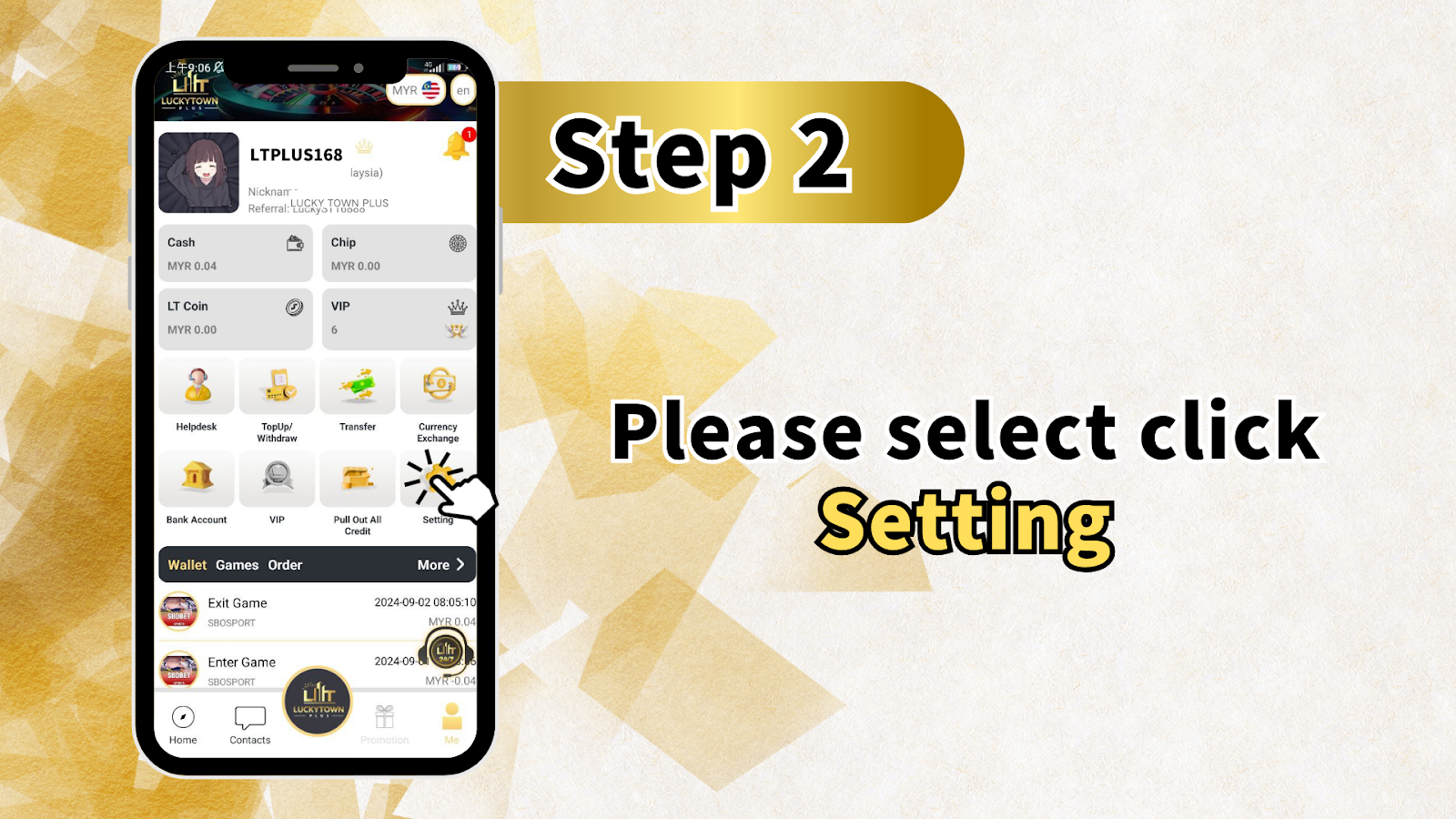
From the main page you can also access:
- Cash – View your current balance
- Chip – Access chip balances for games
- Games – Browse available games
- Info – View account information
- Announcement – Check platform updates
Step 2: Select "Setting"
From your "Me" dashboard, locate and click on "Setting". This will open the full settings menu where you can modify various account preferences and security options.
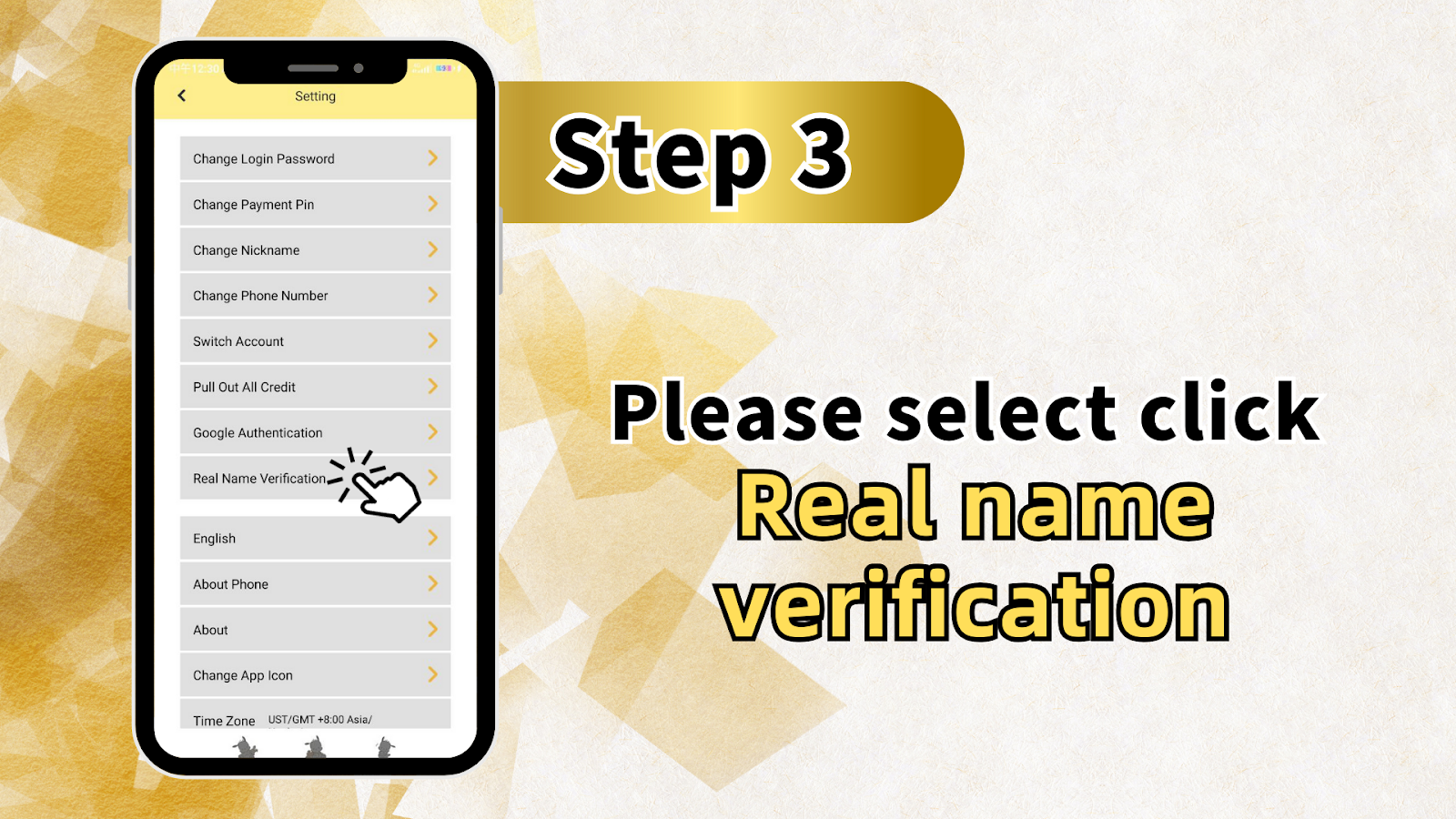
Step 3: Choose "Real Name Verification"
In the Settings menu, scroll through the options until you find "Real Name Verification". Click on this option to begin the verification process. The Settings menu also includes other important options:
Complete Settings Menu Overview
- Change Login Password
- Change Payment Pin
- Change Nickname
- Change Phone Number
- Switch Account
- Pull Out All Credit
- Google Authentication
- Real Name Verification (current option)
- English (language selection)
- About Phone
- About
- Time Zone (US/TGMT +8:00 Asia/)
Step 4: Complete the Verification Form
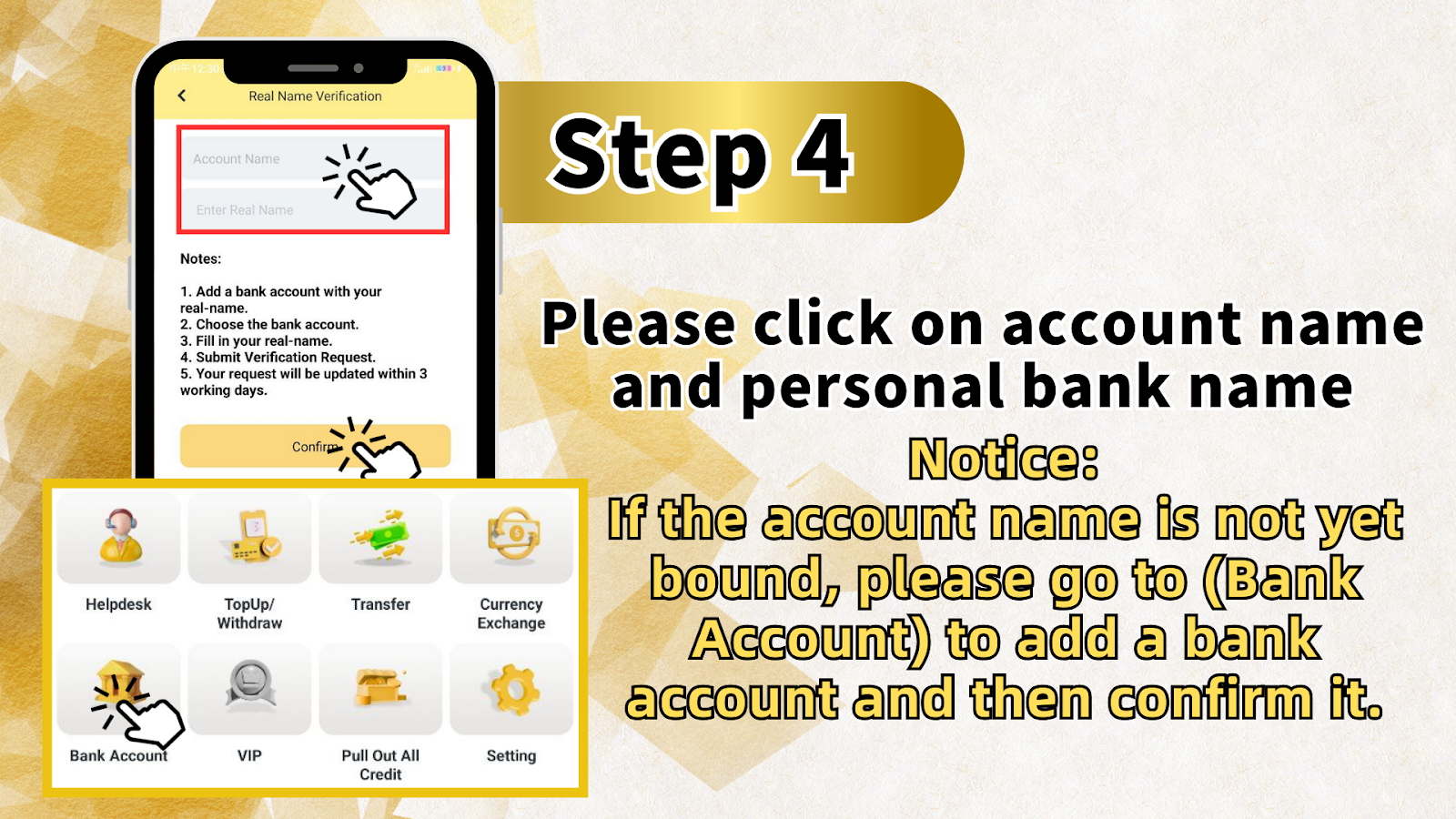
On the Real Name Verification page, you will need to complete the following steps in order:
Step 4.1: Add a Bank Account with Your Real Name
Before submitting your verification request, you must add a bank account that matches your real name. If you haven't already done this, you will see a message indicating: "If the account name is not yet bound, please go to (Bank Account) to add a bank account and then confirm it."
Step 4.2: Navigate to Bank Account Section
From the verification page, you can access the Bank Account section directly through the bottom navigation menu alongside Helpdesk, TopUp/Withdraw, Transfer, Currency Exchange, VIP, Pull Out All Credit, and Setting.
Step 4.3: Add Your Banking Details
In the Bank Account section, add your personal bank account details ensuring the account name matches your official identification exactly. The system will verify that the name on the bank account matches the name you enter for verification.
Step 4.4: Return to Real Name Verification
After successfully adding your bank account, return to the Real Name Verification page. You will now be able to:
Step 4.5: Select Your Bank Account
Choose the bank account you just added from the dropdown menu. Only one account can be selected for verification.
Step 4.6: Fill in Your Real Name
Enter your full real name exactly as it appears on your bank account and official identification documents. This name must match precisely for verification to be successful.
Step 4.7: Submit Verification Request
After completing all fields, click the button to "Submit Verification Request" or "Send a confirmation request". Your request will now be sent to the LUCKYTOWNPLUS verification team for processing.
Step 5: Wait for Processing
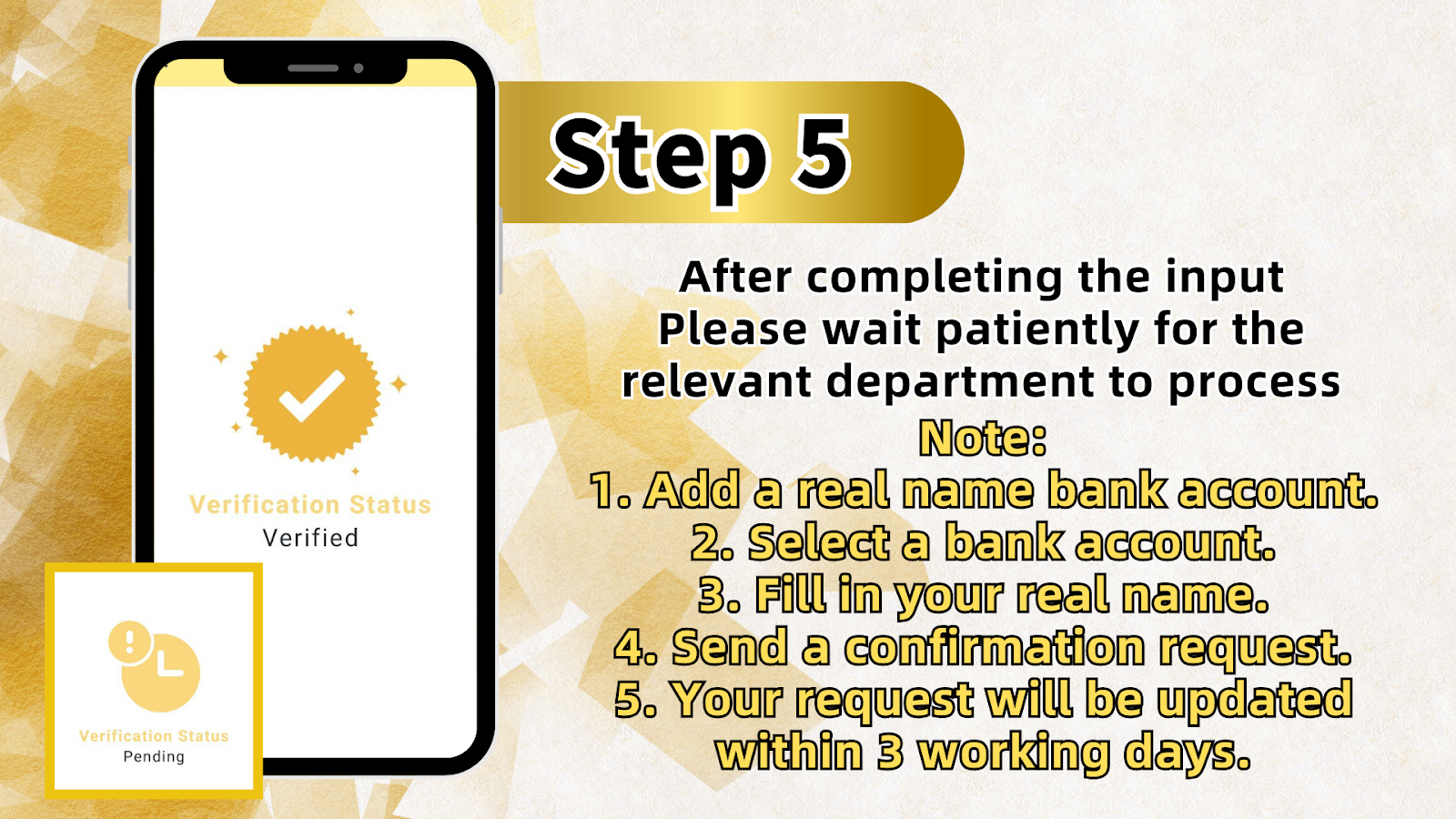
After submitting your verification request, you will see a confirmation message asking you to "Please wait patiently for the relevant department to process." The processing time is clearly stated:
Processing Timeline
"Your request will be updated within 3 working days." The verification team will review your submission and update your account status once approved.
Important Notes for Real Name Verification
Key Requirements Summary
The verification process includes five essential requirements that are repeated throughout the instructions:
1. Add a Real Name Bank Account
You must first add a bank account that uses your real name. This is a prerequisite – verification cannot proceed without a bound bank account.
2. Choose the Bank Account
Select the correct bank account from your list of added accounts. Ensure you select the one that matches the name you will enter.
3. Fill in Your Real Name
Enter your full real name exactly as it appears on your bank account and identification documents. Any discrepancy will delay verification.
4. Submit Verification Request
After completing all fields, formally submit your request through the platform.
5. Processing Time
Your request will be reviewed and updated within 3 working days. No action is required during this period except waiting.
Frequently Asked Questions About Real Name Verification
Why Is Real Name Verification Required?
Real Name Verification is required to comply with financial regulations, prevent fraud, and ensure the security of all LUCKYTOWNPLUS members. Verified accounts also gain full access to withdrawal features and higher transaction limits.
What Documents Do I Need?
You will need a bank account registered in your real name. The name on this account must match your official identification. No additional documents need to be uploaded – the system verifies through bank account details.
How Long Does Verification Take?
Verification requests are processed within 3 working days. You will receive notification once your account status has been updated.
What If My Verification Is Rejected?
If your verification request is rejected, check that your bank account name matches exactly and that you've selected the correct account. You can submit a new request after correcting any issues.
Can I Use Someone Else's Bank Account?
No. The bank account must be registered in your own real name. Using another person's account will cause verification to fail and may result in account restrictions.
Do I Need to Verify to Play Games?
You can play most games without verification, but withdrawals and certain features require completed Real Name Verification. It's recommended to complete verification early to avoid delays when you want to withdraw.
Additional Account Management Options
Related Features in Settings
While completing Real Name Verification, you may also find these related features useful:
Helpdesk
Access customer support for any questions about verification or other account issues.
TopUp/Withdraw
Manage deposits and withdrawals – note that withdrawals require completed verification.
Transfer
Transfer funds between accounts or to other members.
Currency Exchange
Manage currency preferences for your account.
VIP
Check VIP status and benefits.
Pull Out All Credit
Withdraw all funds from your account (requires verification).
Why Complete Real Name Verification on LUCKYTOWNPLUS?
Completing Real Name Verification on LUCKYTOWNPLUS is a simple process that unlocks the full potential of your account. With verified status, you can withdraw funds without delay, access higher transaction limits, and enjoy peace of mind knowing your account meets all security requirements. LUCKYTOWNPLUS is committed to providing a safe, compliant platform for all members, and verification is a key part of that commitment.
Complete Your Real Name Verification on LUCKYTOWNPLUS Today
Ready to secure your account and unlock full access? Follow our step-by-step guide to add your bank account and submit your verification request. The process takes just minutes, and approval is typically completed within 3 working days. Log in now to start your verification.
Start Real Name Verification