
LUCKYTOWNPLUS offers a convenient and secure bank transfer top up method for Malaysian players. Whether you use Maybank, Public Bank, CIMB Bank, or Hong Leong Bank, our step-by-step guide will walk you through the entire process. LUCKYTOWNPLUS ensures your deposits are processed quickly so you can start playing without delay.
Step-by-Step Guide to Bank Transfer Top Up

Step 1: Access the "Me" Section
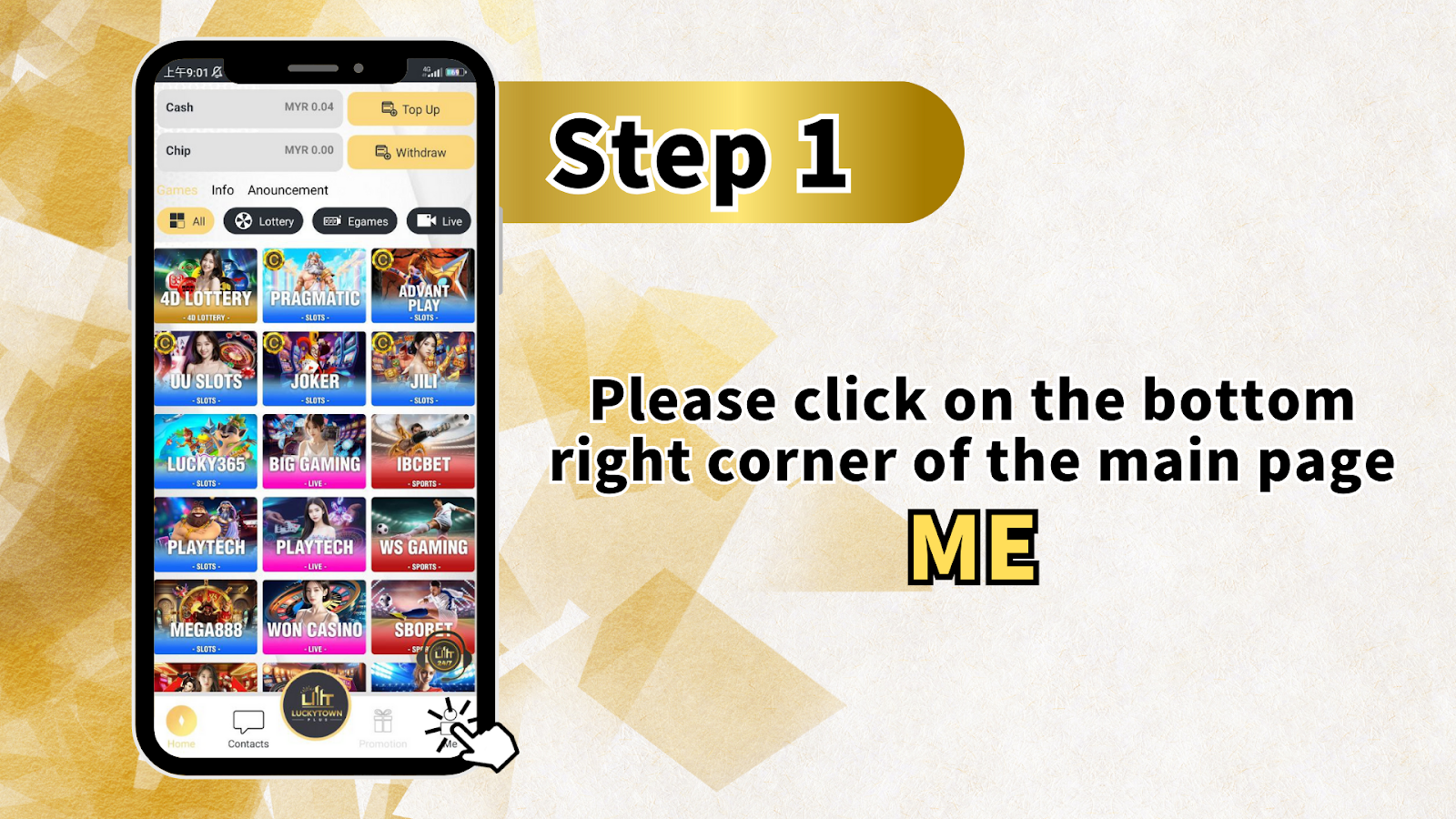
Log in to your LUCKYTOWNPLUS account. On the main page, locate and click the "Me" button in the bottom right corner. This opens your personal dashboard where you can manage your account, check balances, and access financial transactions.
Main Page Navigation Overview
From the main page you can also access:
- Cash – View your current cash balance
- Chip – Access chip balances for games
- Games – Browse available games including 4D LOTTERY, PRAGMATIC, ADVANT PLAY, JOKER, JILI, LUCKY365, BIG GAMING, IBCBET, SPORTS, PLAY TECH, WS GAMING, MEGA888, WON CASINO, and SBOPET
- Info – View account information
- Announcement – Check platform updates
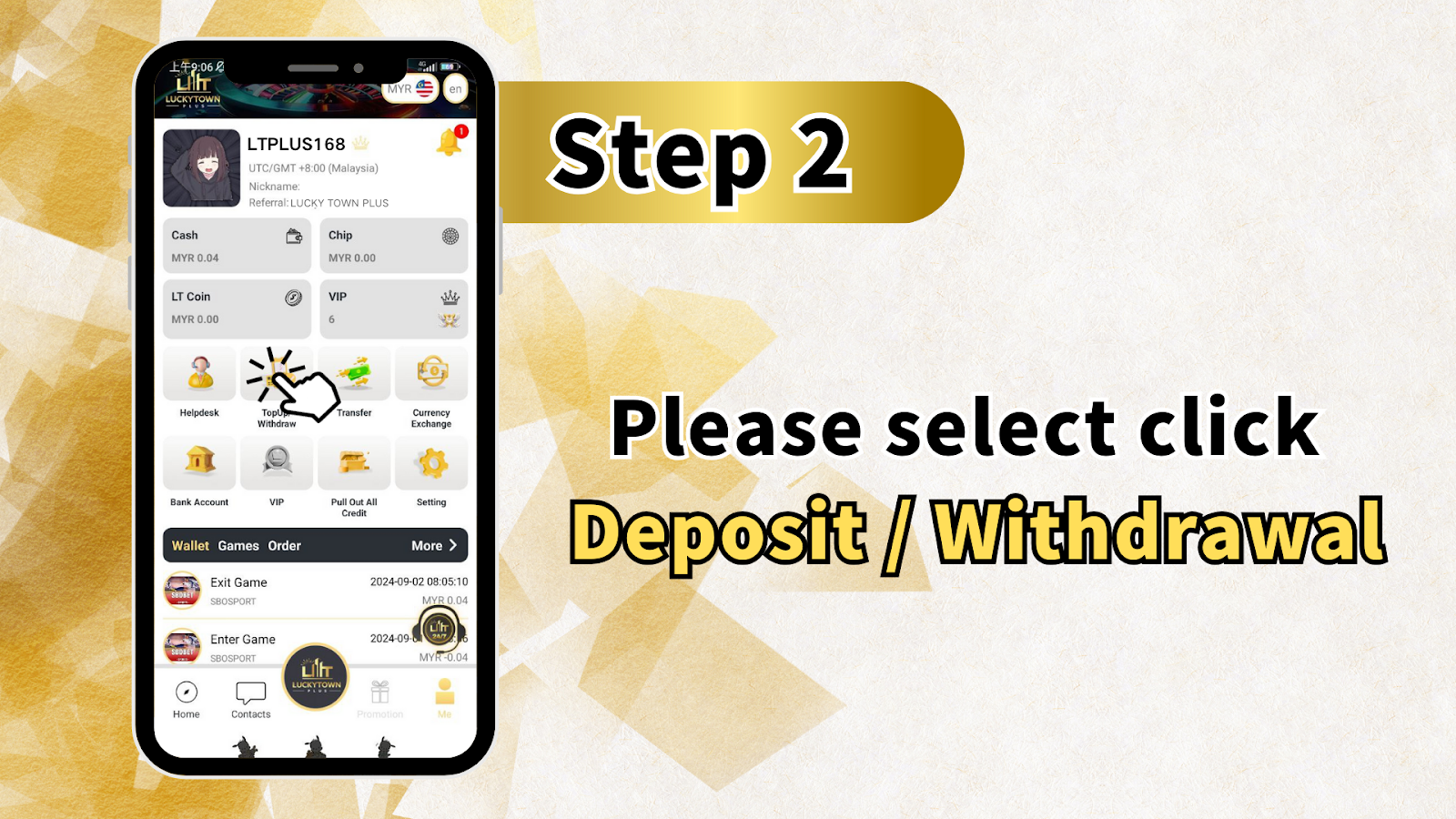
Step 2: Select "Top Up / Withdraw"
From your "Me" dashboard, locate and click on "Top Up" (or "Deposit/Withdrawal" ). This will take you to the main financial transaction page where you can choose between depositing funds or making withdrawals.
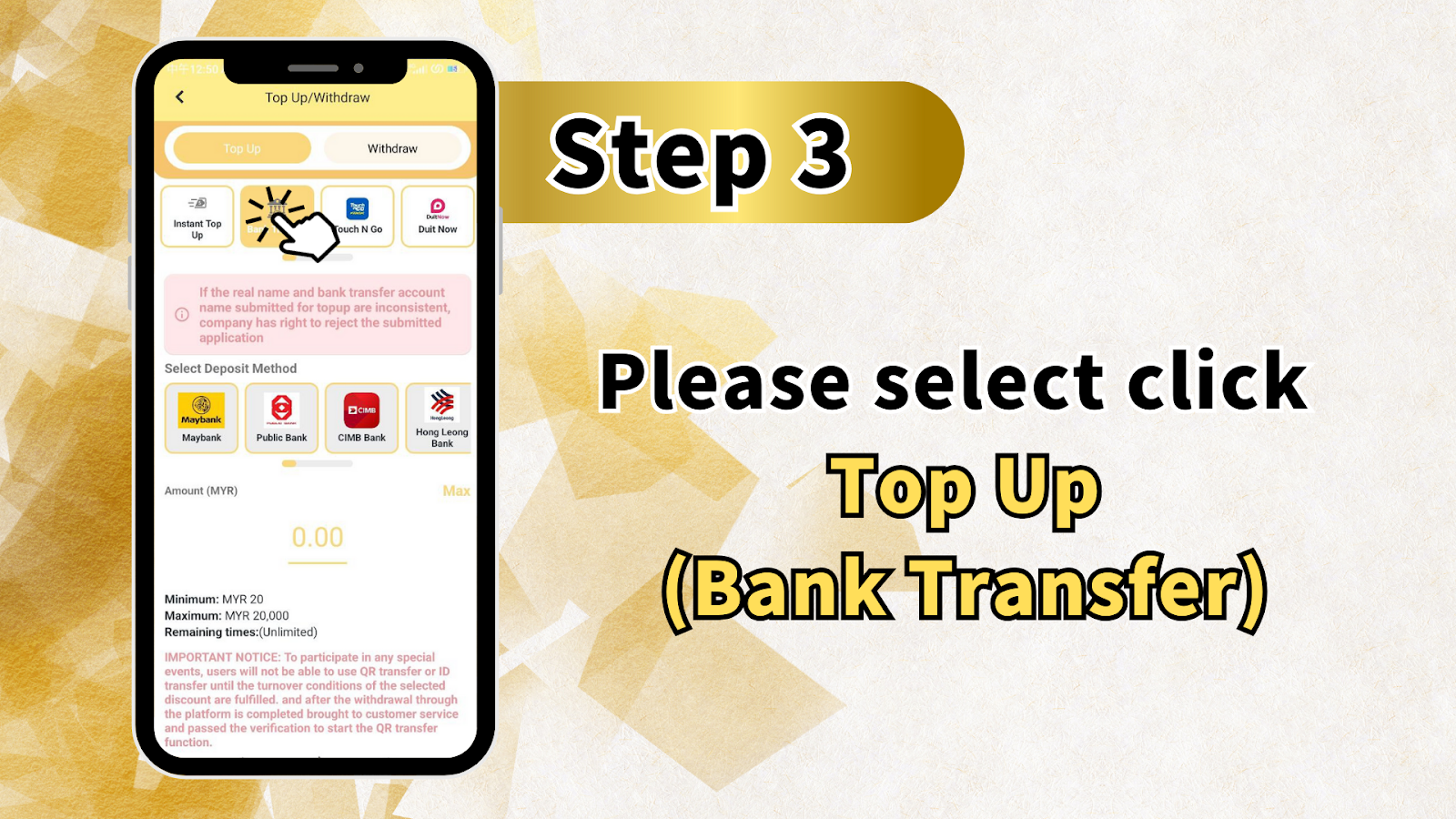
Step 3: Choose "Top Up" as Your Transaction Type
On the Top Up/Withdraw page, you will see two main options: Top Up and Withdraw. Select Top Up to begin the deposit process. The page also displays important notices about name verification.
Important Name Verification Notice
"If the real name and bank transfer account name submitted for to pay are inconsistent, company has right to reject the submitted application." This means the name on your LUCKYTOWNPLUS account must match the name on the bank account you use for transfers.
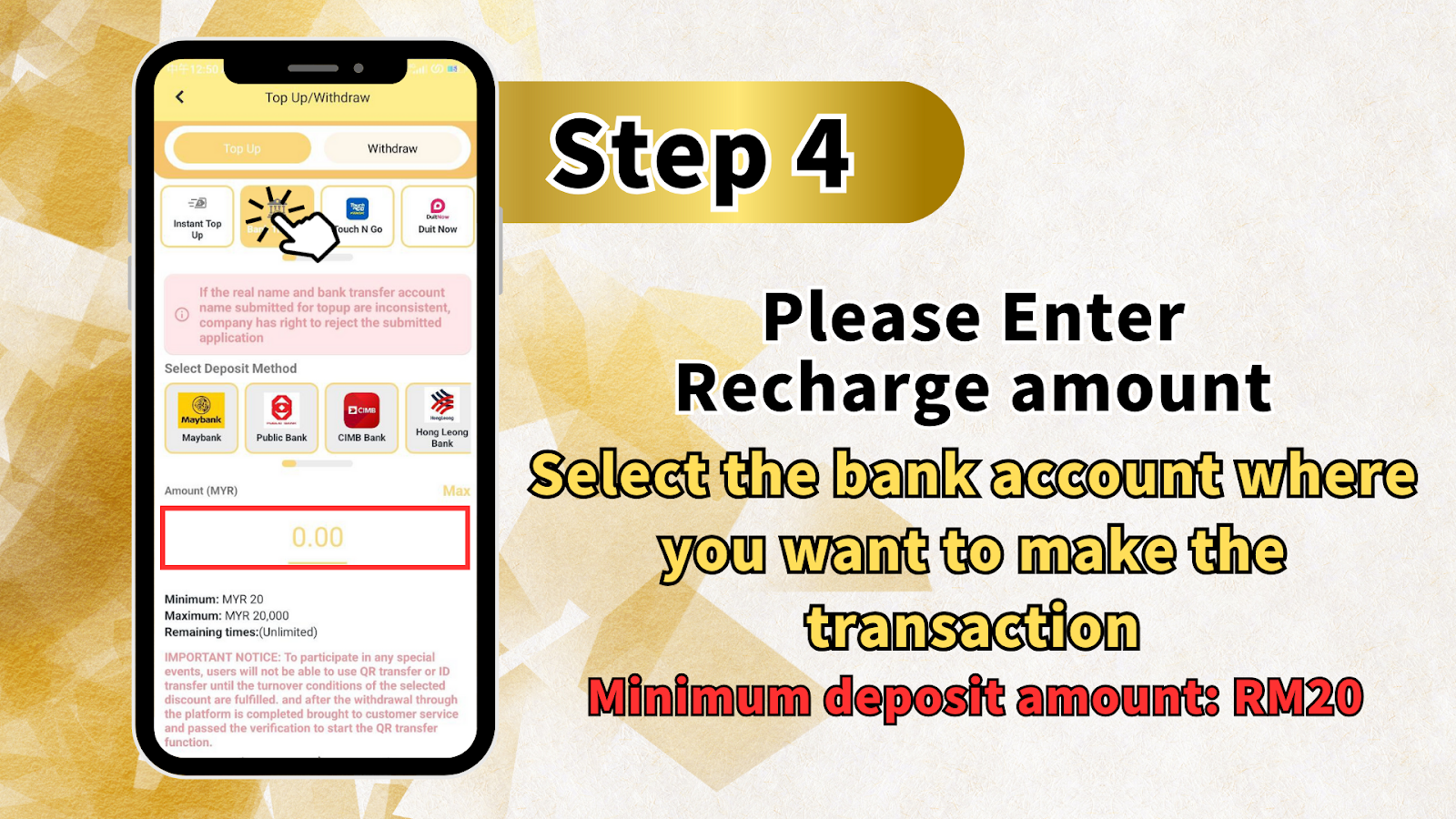
Step 4: Select Your Deposit Method and Enter Amount
Under "Select Deposit Method," choose your bank from the available options:
Available Banks
- Maybank
- Public Bank
- CIMB Bank
- Hong Leong Bank (also shown as Hong Kong Bank in some screens)
Enter Deposit Amount
In the "Amount (MYR)" field, enter the amount you wish to deposit. The system displays:
Deposit Limits
- Minimum: RM20
- Maximum: RM20,000
- Remaining Time: Unlimited
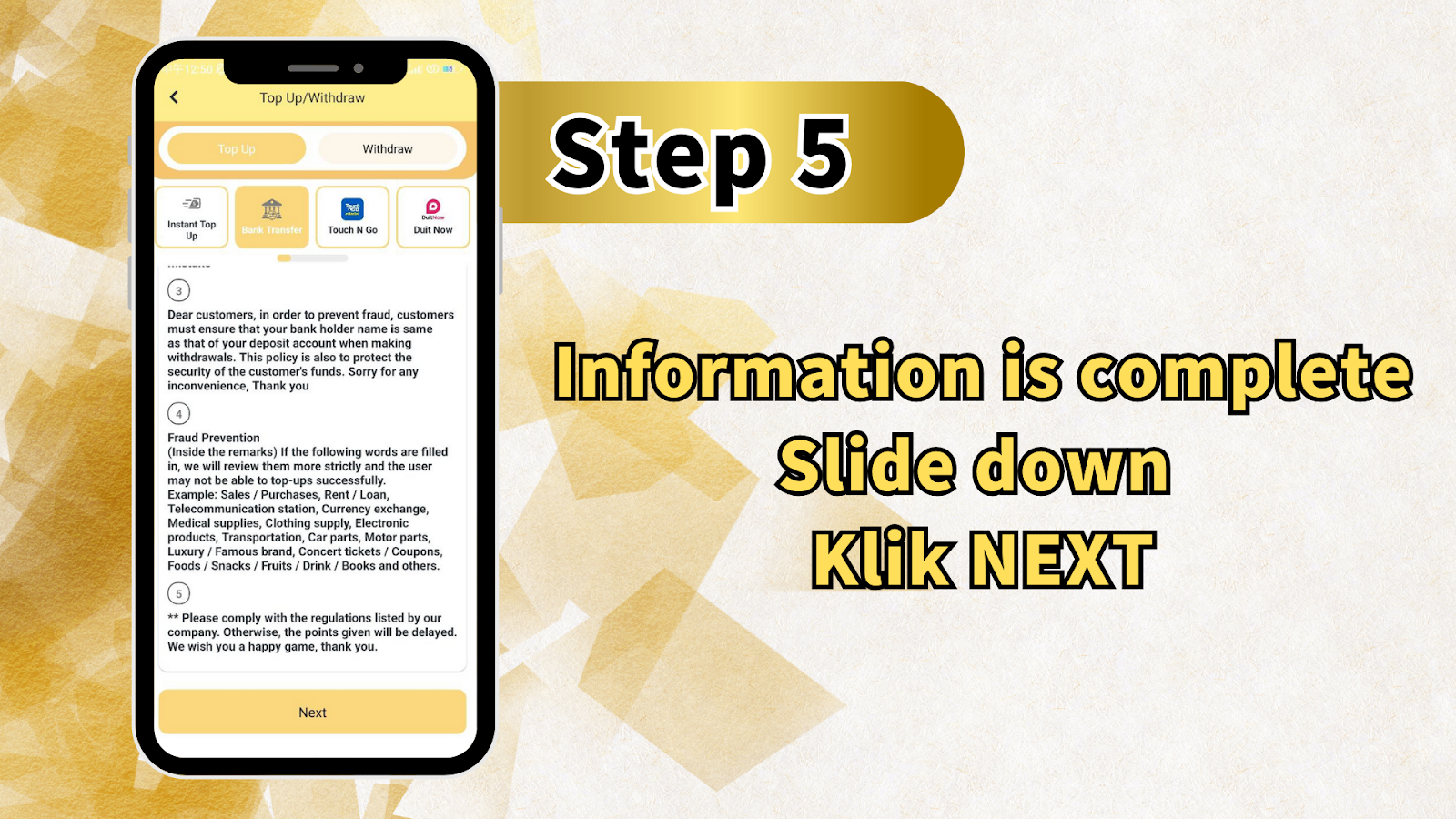
Step 5: Review Important Notices and Select Transfer Method
Before proceeding, review the following important information:
Important Notice About Promotions
"IMPORTANT NOTICE: To participate in any special events, users will not be able to use QR transfer or ID transfer until the turnover conditions of the selected discount are fulfilled, and after the withdrawal through the platform is completed brought to customer service and passed the verification to start the QR transfer function."
Select Transfer Method
You will see multiple transfer options including:
- Instant Top Up
- Black Transfer (may refer to standard bank transfer)
- Touch N Go
- Duit Now
For bank transfer top up, select the appropriate bank transfer option.
Fraud Prevention Guidelines
"Dear customers, in order to prevent fraud, customers must ensure that your bank holder name is same as that of your deposit account when making withdrawals. This policy is also to protect the security of the customer's funds. Sorry for any inconvenience, Thank you."
Prohibited Remarks in Transfers
The following words in transfer remarks will trigger stricter review and may cause top up failure: Sales / Purchases, Rent / Loan, Telecommunication station, Currency exchange, Medical supplies, Clothing supply, Electronic products, Transportation, Car parts, Motor parts, Luxury / Famous brand, Concert tickets / Coupons, Foods / Snacks / Fruits / Drink / Books and others.
Compliance Reminder
"Please comply with the regulations listed by our company. Otherwise, the points given will be delayed. We wish you a happy game, thank you."
Step 6: Copy LUCKYTOWNPLUS Bank Account Details
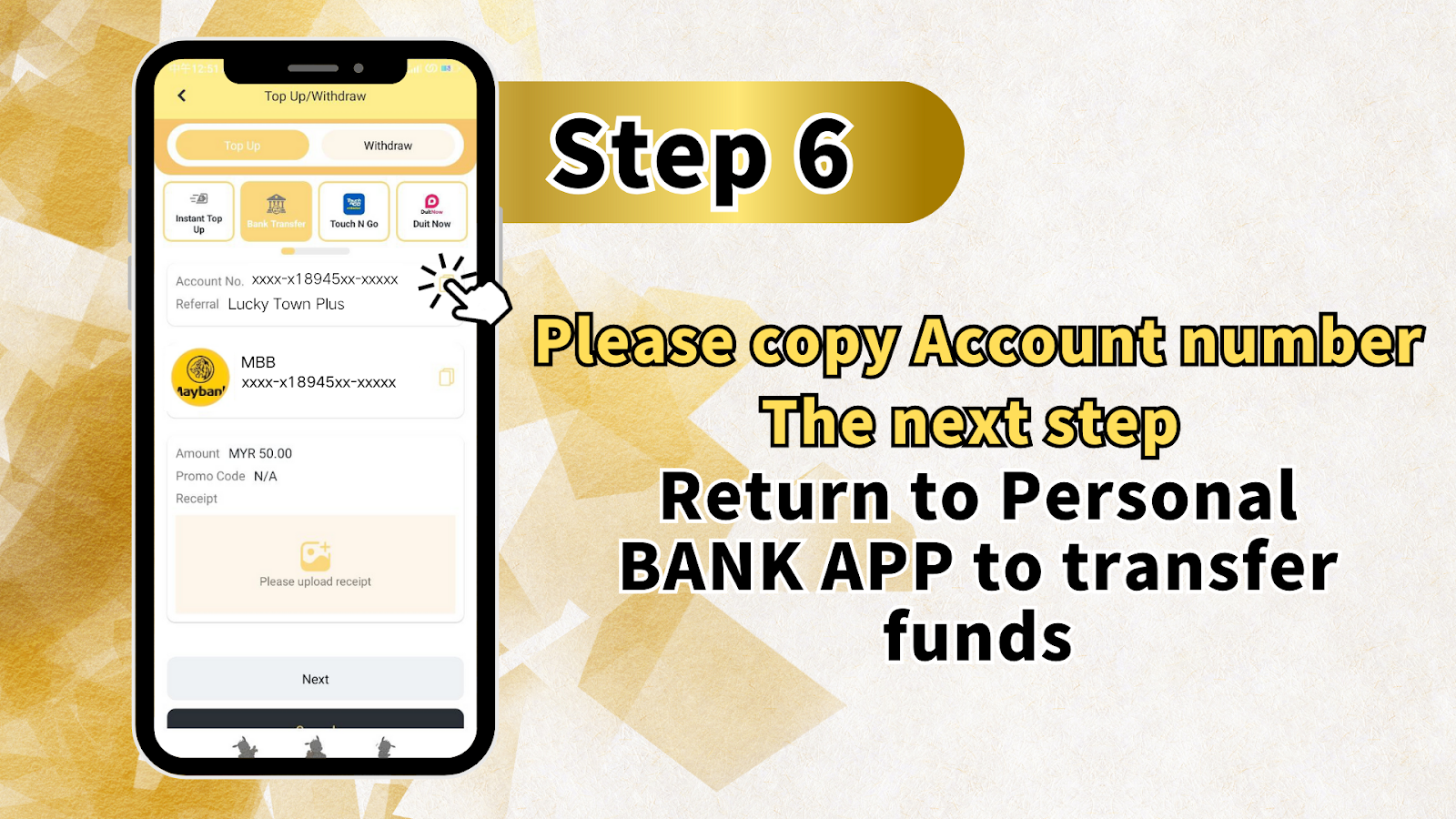
After selecting your deposit method and amount, the system will display the LUCKYTOWNPLUS bank account details for your selected bank. You will see:
Account Information Display
- Account Number: Shown in masked format (e.g., xxxx-x18945xx-xxxxx)
- Reference: "Referral Lucky Town Plus"
Action Required
"Please copy Account number" and then proceed to your own banking app to complete the transfer. The screen provides buttons for "The next step" and "Return to Personal" to help you navigate.
Step 7: Complete Transfer in Your Banking App
Open your bank's mobile app or internet banking platform. Perform the fund transfer using the account number you copied from LUCKYTOWNPLUS. Ensure the transfer amount matches exactly what you entered in Step 4.
After Transfer Completion
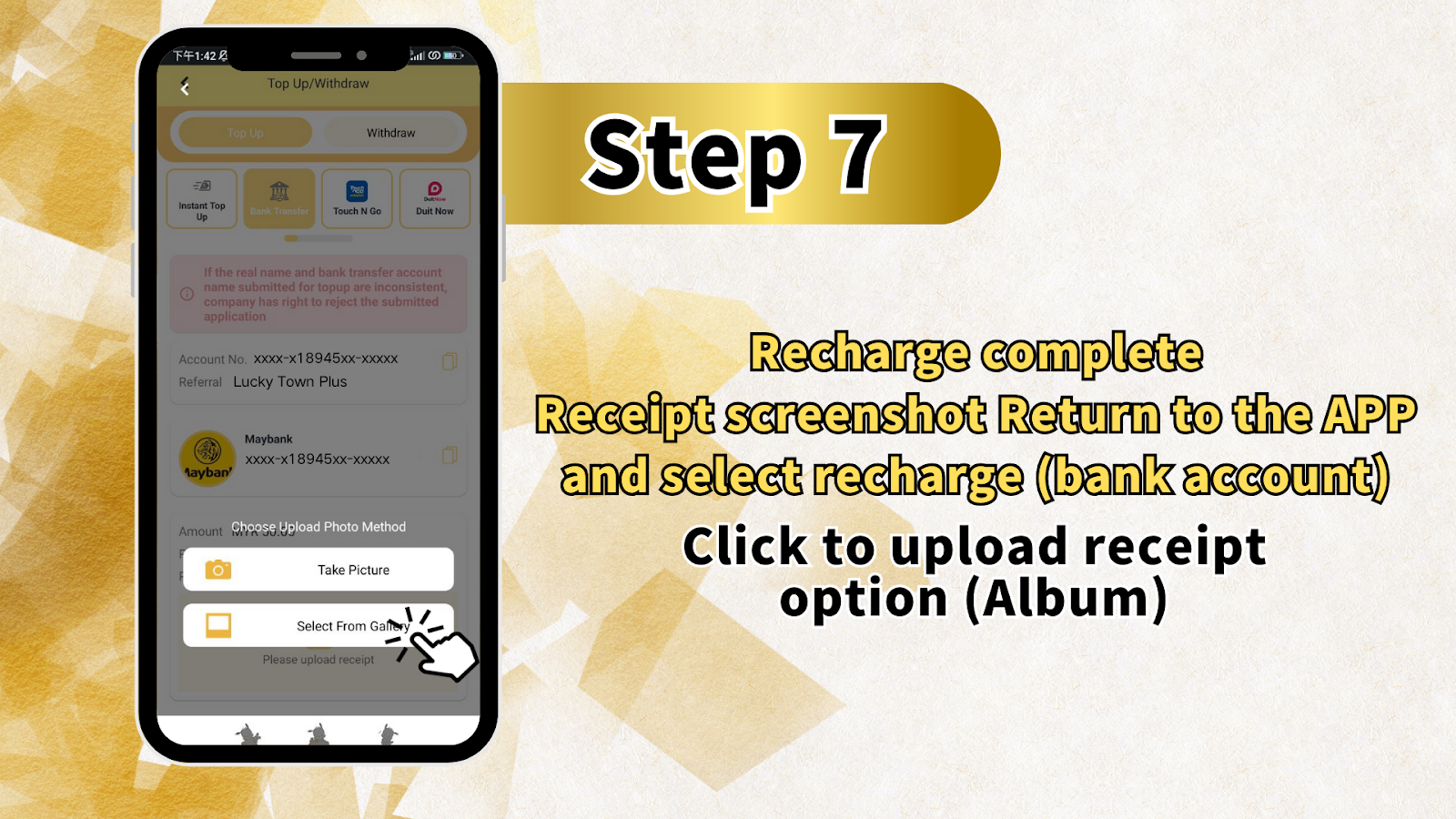
"Recharge complete. Receipt screenshot Return to the APP and select recharge (bank account) Click to upload receipt option (Album)." Take a screenshot of your transfer confirmation receipt.
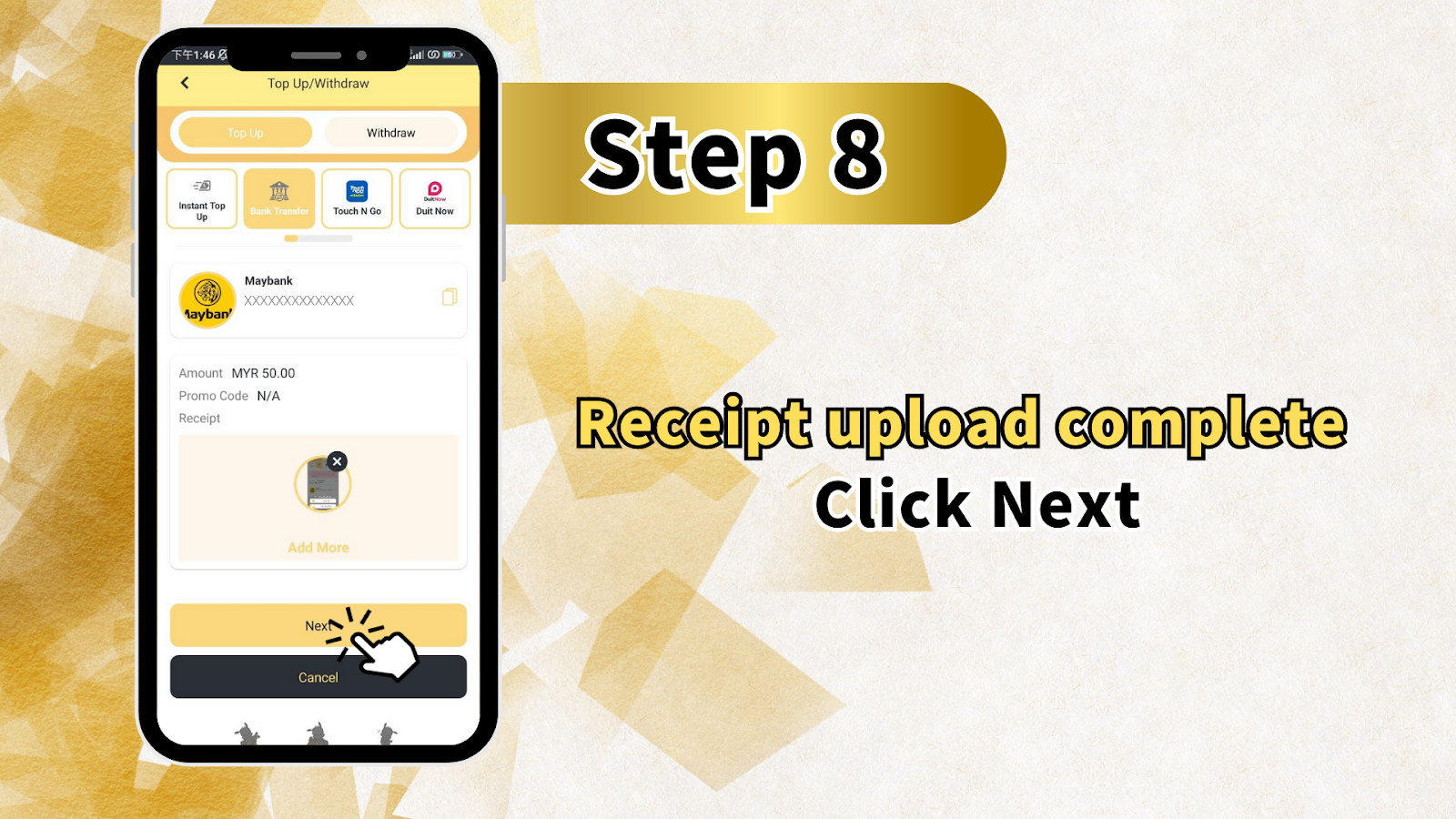
Step 8: Return to LUCKYTOWNPLUS and Upload Receipt
Return to the LUCKYTOWNPLUS app or website. You should see a screen displaying:
Receipt Upload Screen
- Amount: Shows your deposit amount (e.g., MYR 50.00)
- Promo Code: N/A (or enter if you have one)
- Receipt: Option to upload your screenshot
- Buttons: "Add More," "Next," and "Cancel"
Action Required
Click to upload your receipt screenshot from your device's album or gallery. After uploading, click "Next" to proceed.
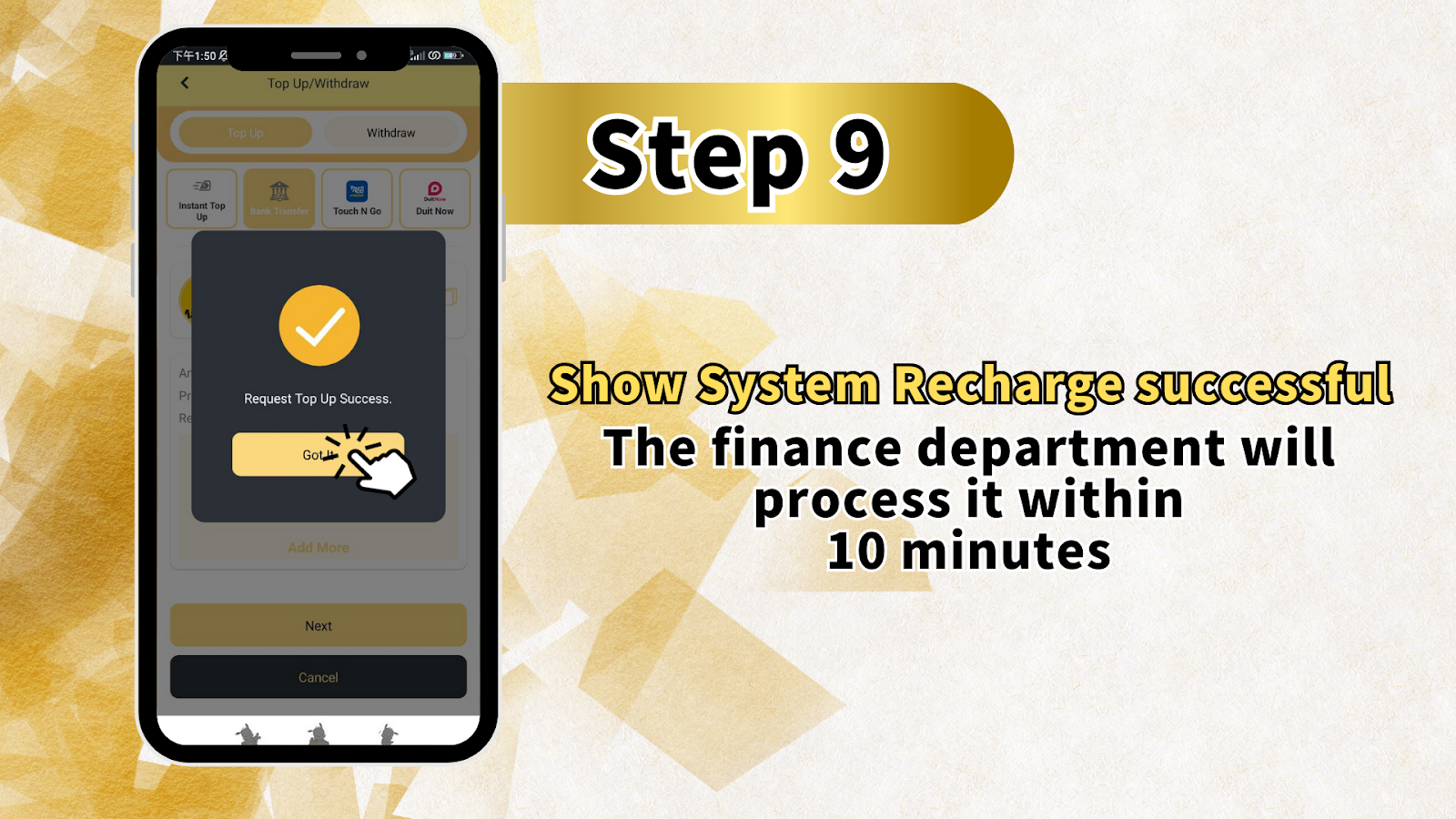
Step 9: Wait for Processing Confirmation
After submitting your receipt, you will see a confirmation message:
Processing Time
"Show System Recharge successful. The finance department will process it within 10 minutes." Your funds will be credited to your LUCKYTOWNPLUS account after verification by the finance team.
Important Notes for Bank Transfer Top Up
Name Matching Requirement
The name on your LUCKYTOWNPLUS account must match the name on your bank account exactly. Any inconsistency may result in rejection of your deposit application.
Deposit Limits Summary
- Minimum Deposit: RM20
- Maximum Deposit: RM20,000 per transaction
- Processing Time: Within 10 minutes after receipt submission
Fraud Prevention Measures
LUCKYTOWNPLUS takes fraud prevention seriously. Always ensure your bank account name matches your registered name, and avoid using prohibited words in transfer remarks to prevent delays or rejections.
Prohibited Words List
Do not include these words in your transfer remarks: Sales, Purchases, Rent, Loan, Telecommunication station, Currency exchange, Medical supplies, Clothing supply, Electronic products, Transportation, Car parts, Motor parts, Luxury, Famous brand, Concert tickets, Coupons, Foods, Snacks, Fruits, Drink, Books, and others.
Frequently Asked Questions About Bank Transfer Top Up
How Long Does a Bank Transfer Top Up Take?
After you complete the transfer and upload your receipt, the LUCKYTOWNPLUS finance department typically processes your deposit within 10 minutes. During peak times, it may take slightly longer.
What If My Bank Name Doesn't Match My Account Name?
If the name on your bank account does not match your registered LUCKYTOWNPLUS account name, your deposit may be rejected. Complete Real Name Verification first and ensure your bank account is registered under the same name.
Can I Deposit Using Someone Else's Bank Account?
No. The bank account used for transfer must be in your own name. Using another person's account violates security policies and will result in rejection.
What Happens If I Use Prohibited Words in Remarks?
If your transfer remarks contain any prohibited words, your deposit will undergo stricter review and may fail. Always leave remarks blank or use only neutral terms if required.
Is There a Fee for Bank Transfer Top Up?
LUCKYTOWNPLUS does not charge fees for bank transfer deposits. However, your bank may impose its own transfer fees – please check with your bank.
What If I Forget to Upload My Receipt?
If you complete the bank transfer but forget to upload your receipt, your deposit may not be processed automatically. Contact customer service with your transfer details and receipt to request manual processing.
Can I Cancel a Deposit After Transfer?
Once a bank transfer is completed, it cannot be canceled. If you need assistance, contact LUCKYTOWNPLUS customer support.
Why Choose Bank Transfer Top Up on LUCKYTOWNPLUS?
Bank transfer is one of the most trusted and widely used deposit methods for Malaysian players. LUCKYTOWNPLUS offers competitive limits (RM20 to RM20,000), fast processing within 10 minutes, and support for all major Malaysian banks including Maybank, Public Bank, CIMB, and Hong Leong. Our clear step-by-step process ensures you can deposit funds quickly and securely, with fraud prevention measures protecting your account at every stage.
Top Up Now with Bank Transfer on LUCKYTOWNPLUS
Ready to add funds to your LUCKYTOWNPLUS account? Follow our 9-step guide to complete your bank transfer deposit. Minimum RM20, maximum RM20,000, with processing in as little as 10 minutes. Log in now to start your top up – or sign up in minutes using your Malaysia phone number.
Start Bank Transfer Top Up