

LUCKYTOWNPLUS provides multiple options to help you manage your account credentials. Whether you need to change your password for security reasons, have forgotten your password, or can't remember your username, our step-by-step guides will walk you through each recovery process. LUCKYTOWNPLUS uses OTP verification via your registered phone number to ensure secure account access.
Section 1: How to Change Your Password (When You Know Your Current Password)
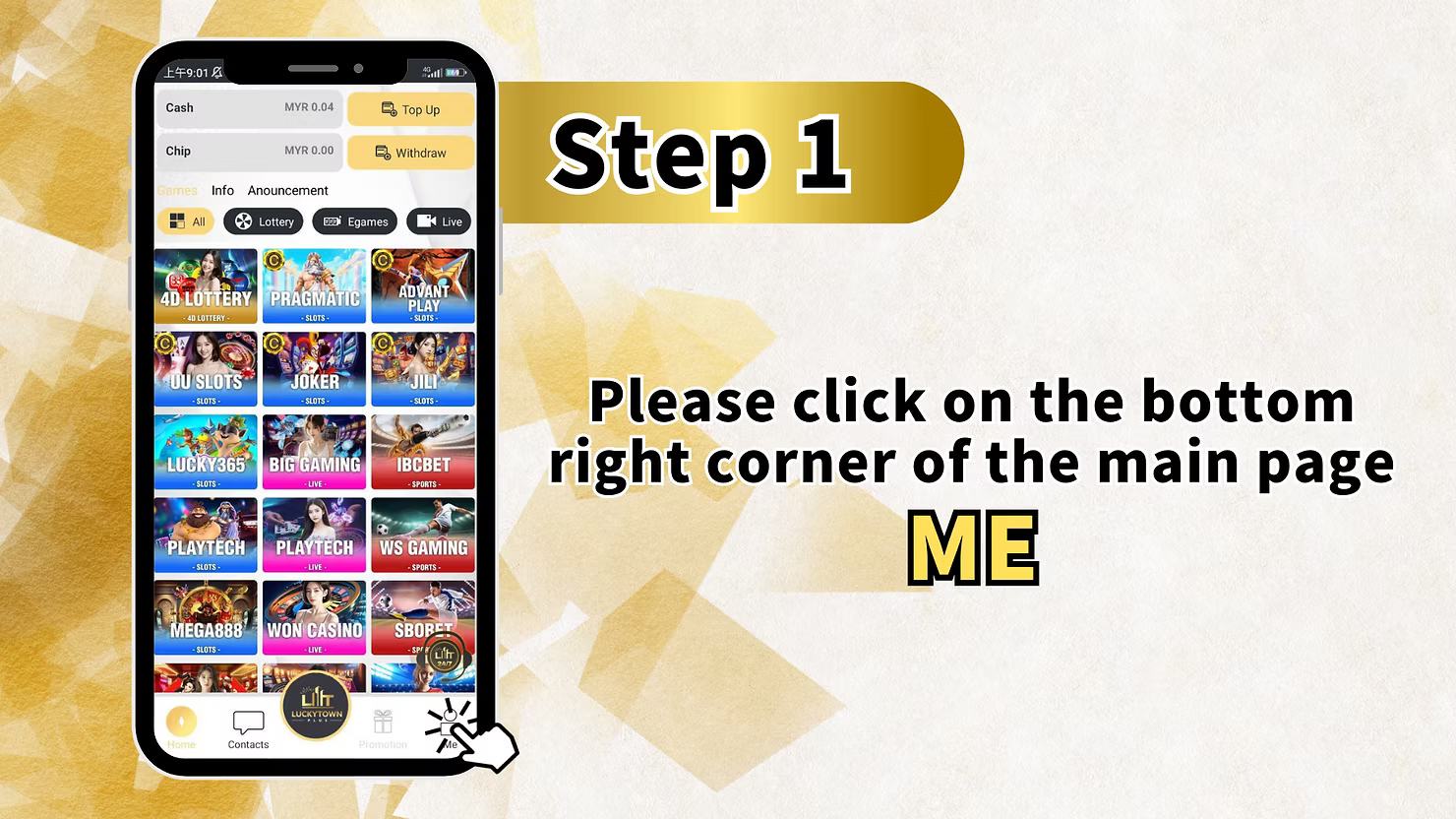
Step 1: Access the Main Page Bottom Right Corner
Log in to your LUCKYTOWNPLUS account. On the main page, locate and click the button in the bottom right corner(typically "Me" or similar) to access your personal dashboard.
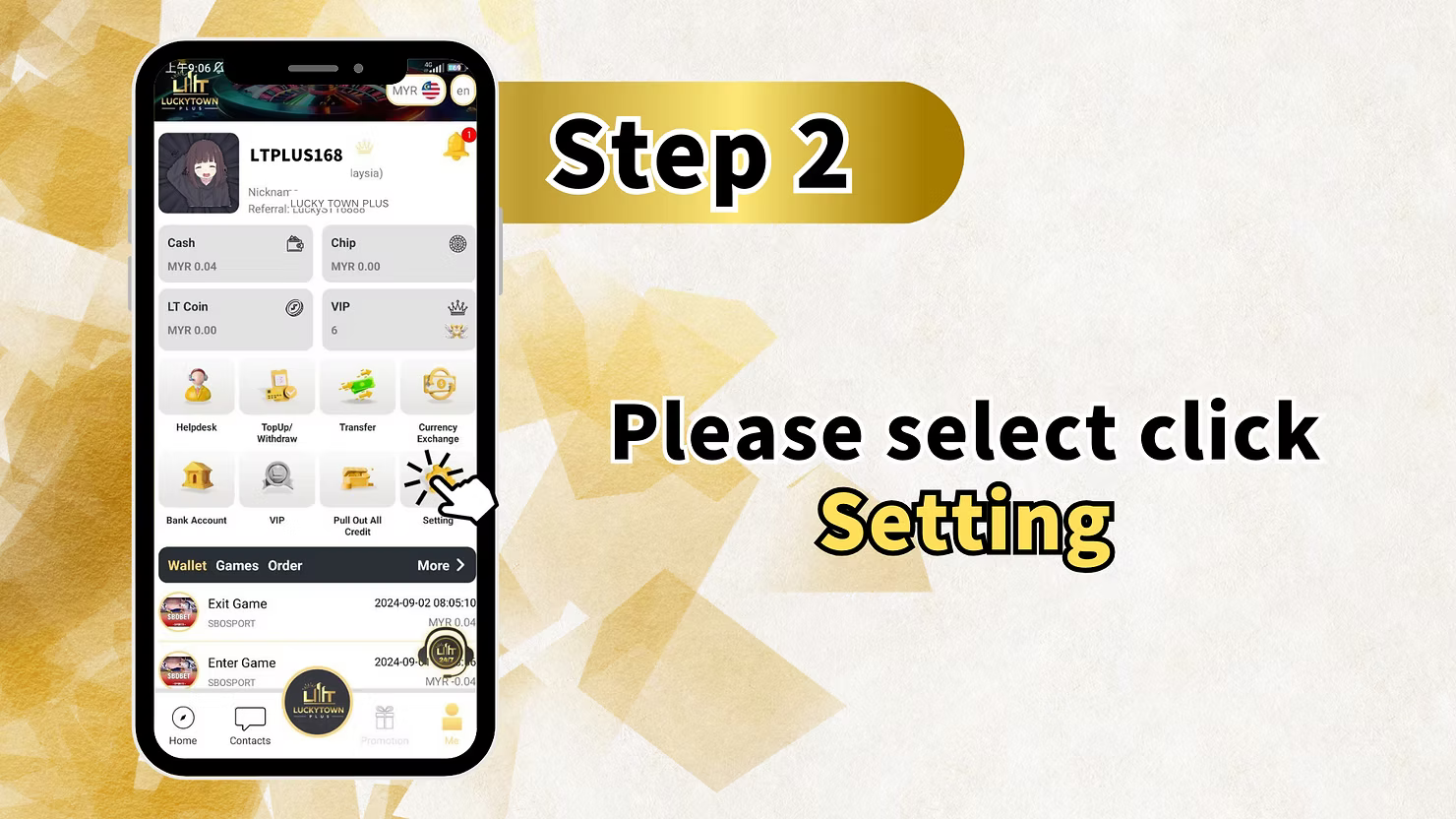
Step 2: Select "Saving"
From your dashboard, locate and click on "Saving" . This may also be labeled as "Settings" or similar in some versions.
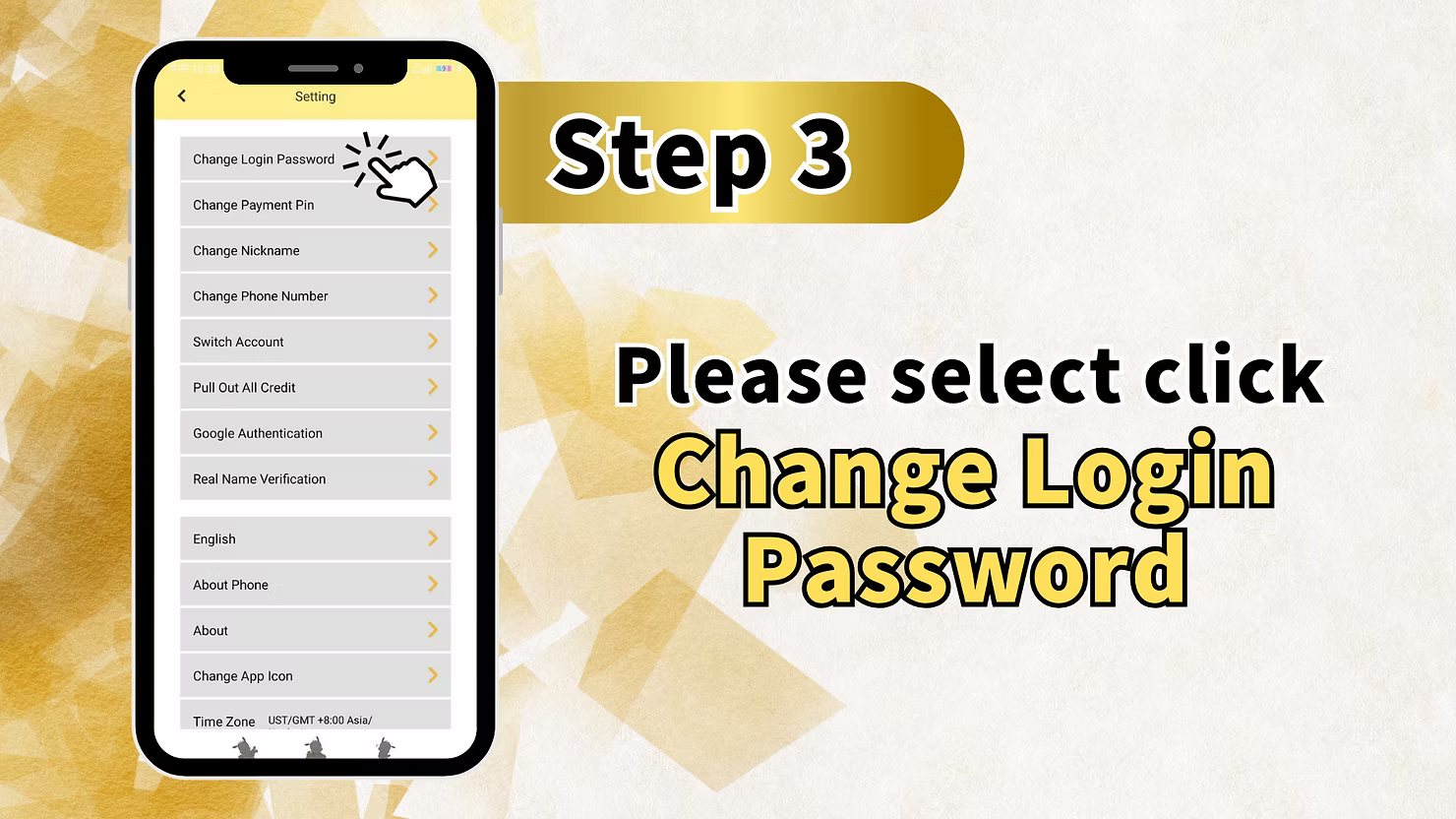
Step 3: Select "Change Login Password"
In the Saving/Settings menu, find and click on "Change Login Password" . This will open the password change interface.
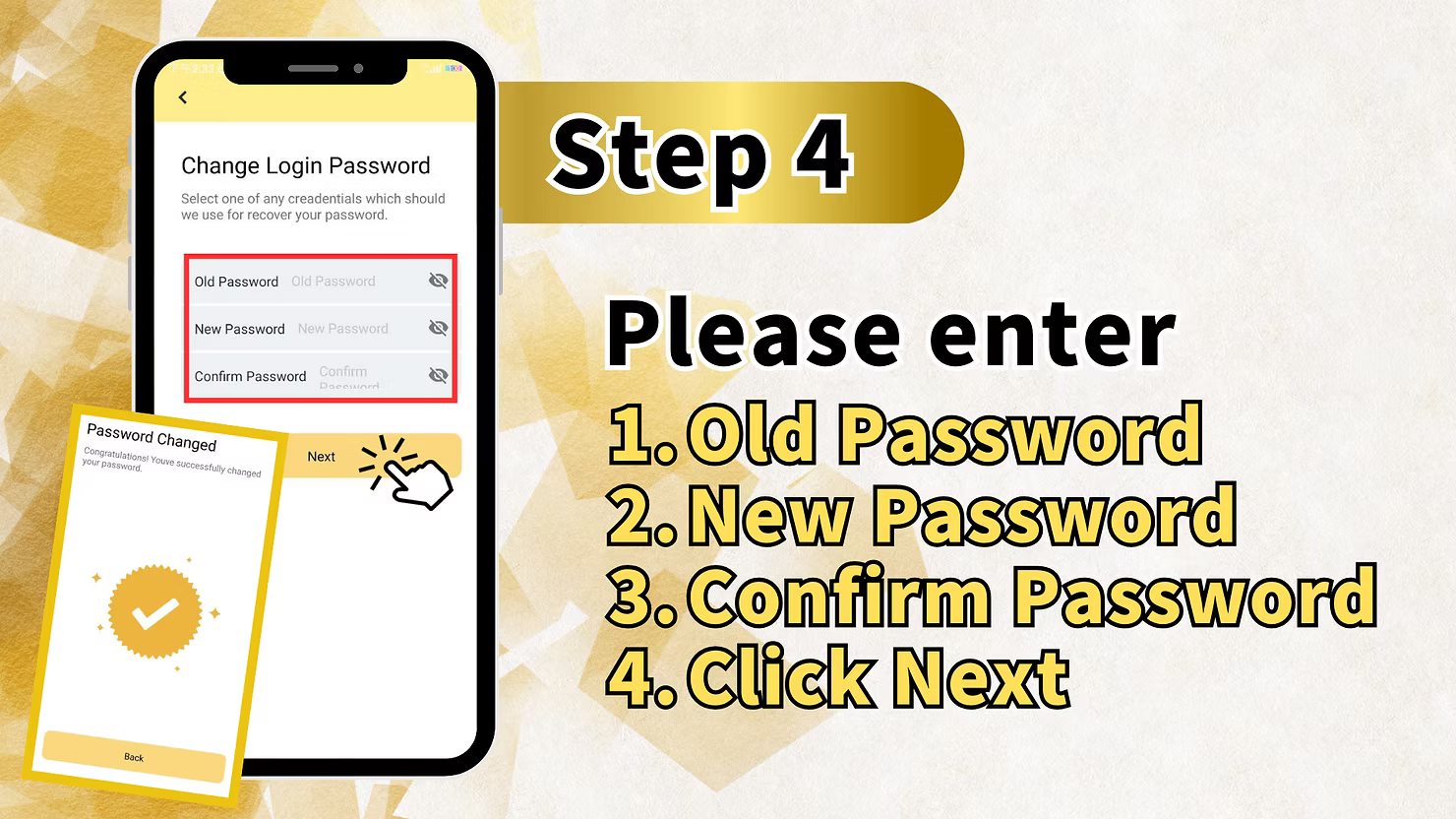
Step 4: Enter Your Old Password and New Password
On the password change screen, complete the following fields:
1. Enter Old Password
Type your current password in the "Old Password" field. This verifies that you are the account owner.
2. Enter New Password
Type your desired new password in the "New Password" field. Ensure it meets the platform's security requirements (minimum 8 characters, no spaces).
3. Confirm New Password
Re-type your new password in the "Confirm Password" field to ensure there are no typing errors.
4. Click Next
After completing all fields, click "Next" to submit your password change request. The system will update your password immediately.
Section 2: How to Recover a Forgotten Password
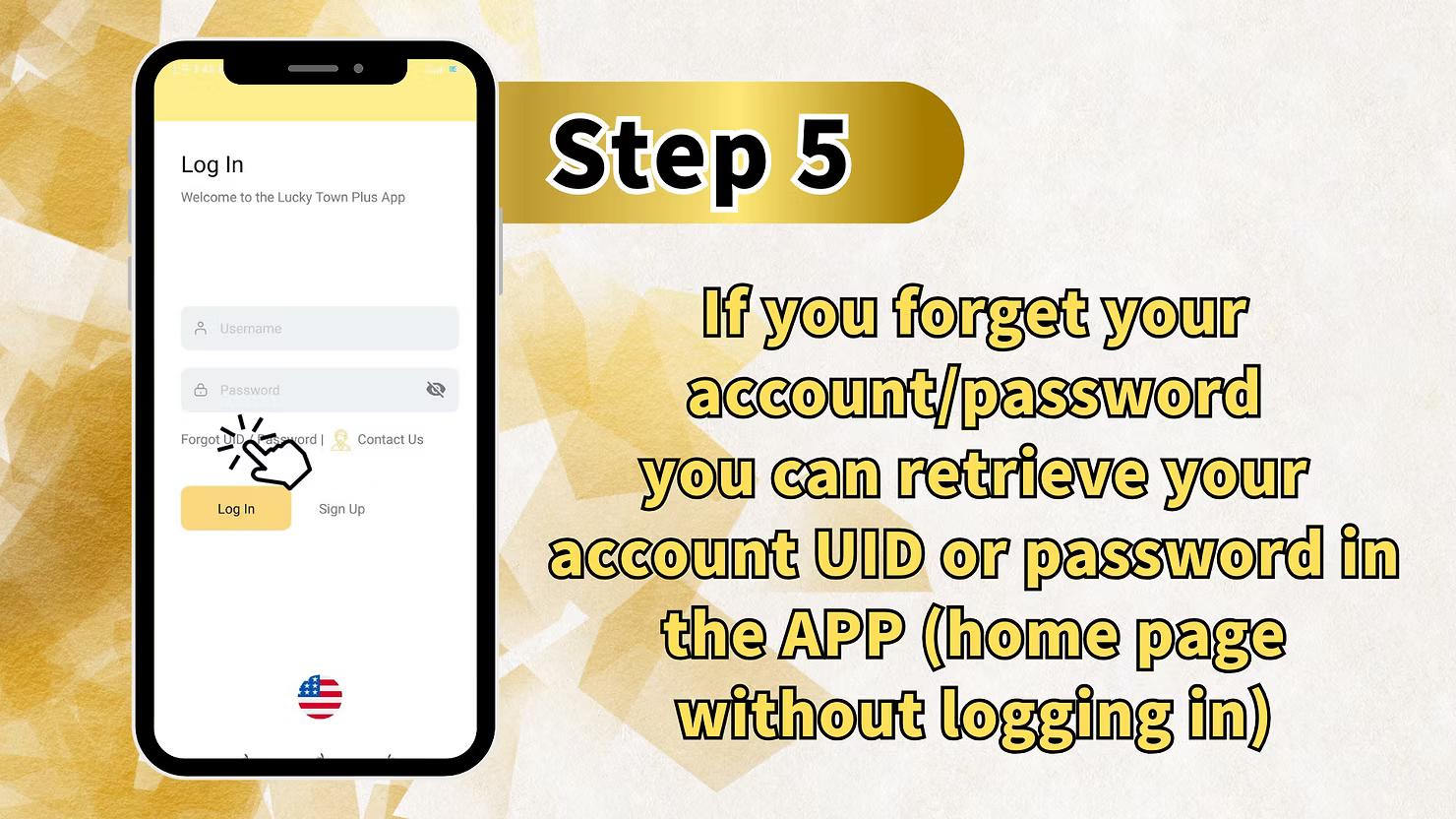
Step 1: Access the Forgot Password Option (Without Logging In)
If you cannot log in because you forgot your password, start from the LUCKYTOWNPLUS home page without logging in. Look for and click the "forget password" or "Forgot Password" link on the login screen.
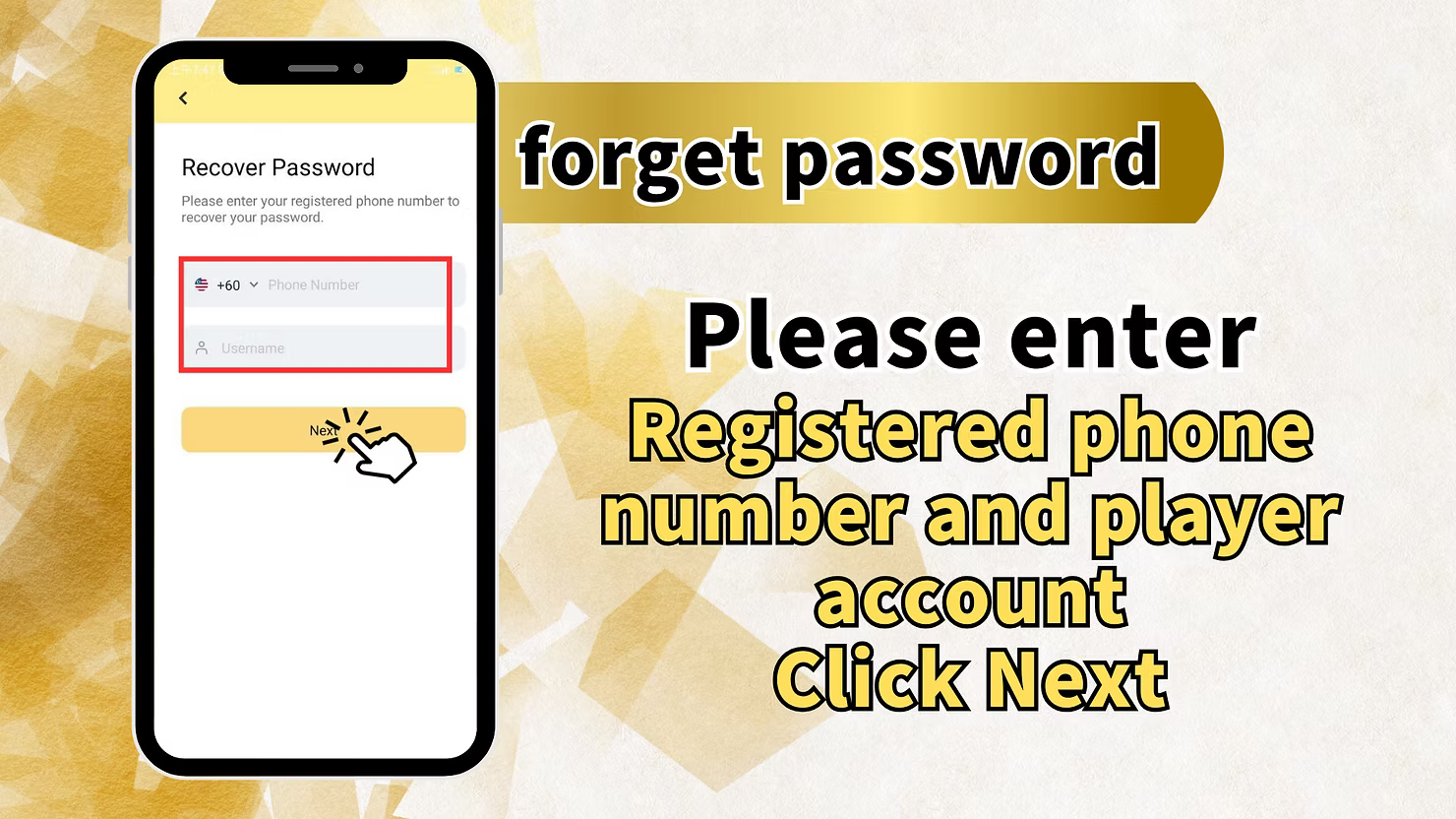
Step 2: Enter Your Registered Phone Number and Username
You will be taken to the "Recover Password" screen, which displays:
Recover Password Screen
"Please enter your registered phone number to recover your password."Complete the following fields:
- +60 Phone Number – Enter your Malaysia phone number exactly as registered
- Username – Enter your account username (if you remember it)
Important Reminder
"Registered phone number and player account" – Both pieces of information help verify your identity.
Step 3: Click Next to Proceed
After entering your phone number and username, click "Next" to continue.
Step 4: Verify with OTP
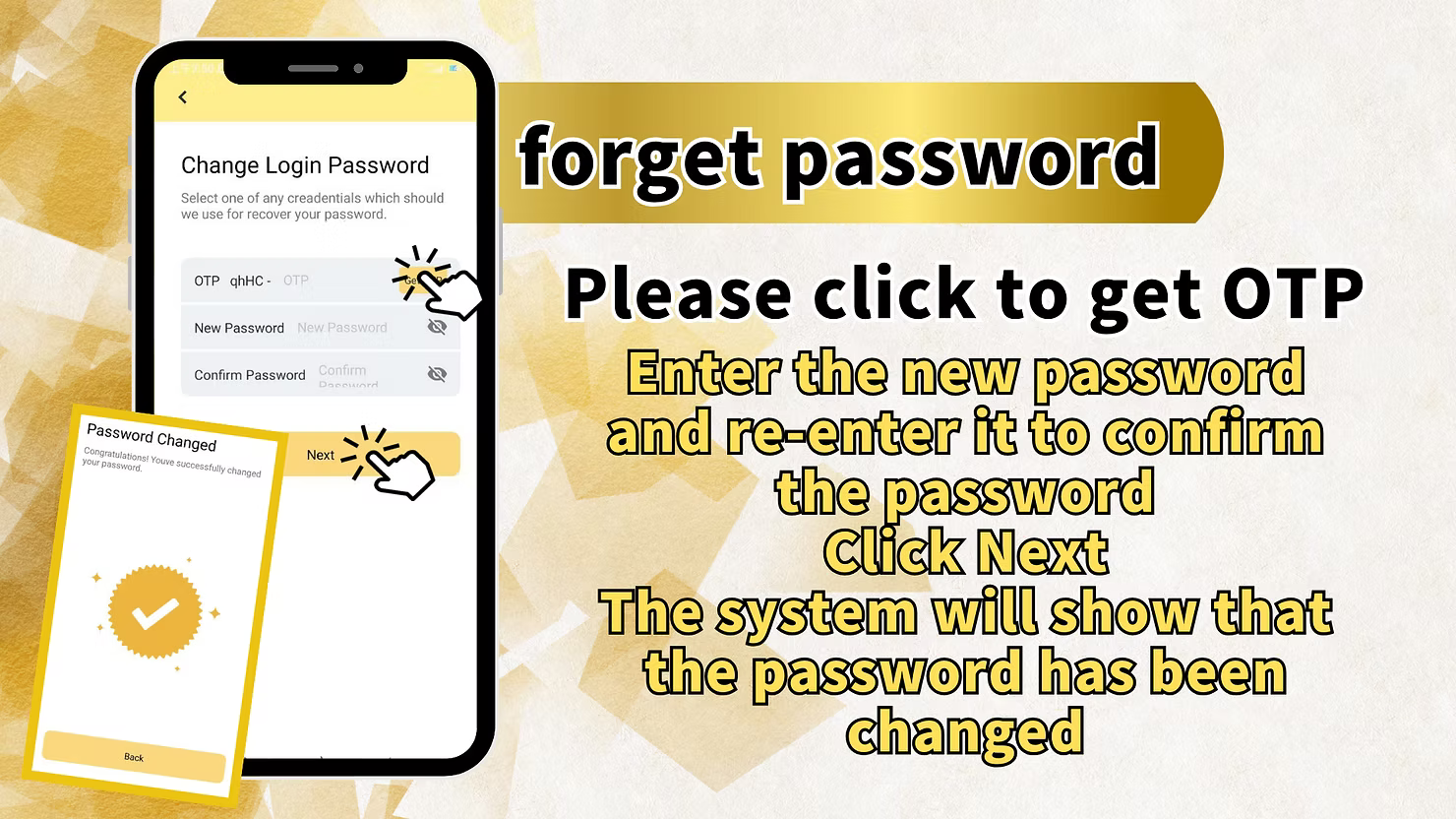
You will now see the "Change Login Password" screen with OTP verification:
OTP Verification
"Please click to get OTP" – Click the button to request a one-time password via SMS to your registered phone number. Enter the OTP code you receive in the designated field (labeled "OTP qhHC- OTP" in the example).
Enter New Password
After OTP verification, enter your new password in the "New Password" field, then re-enter it in the "Confirm Password"field to confirm.
Complete Password Change
"Enter the new password and re-enter it to confirm the password Click Next The system will show that the password has been changed." Click "Next" to finalize your new password.
Section 3: How to Recover a Forgotten Username
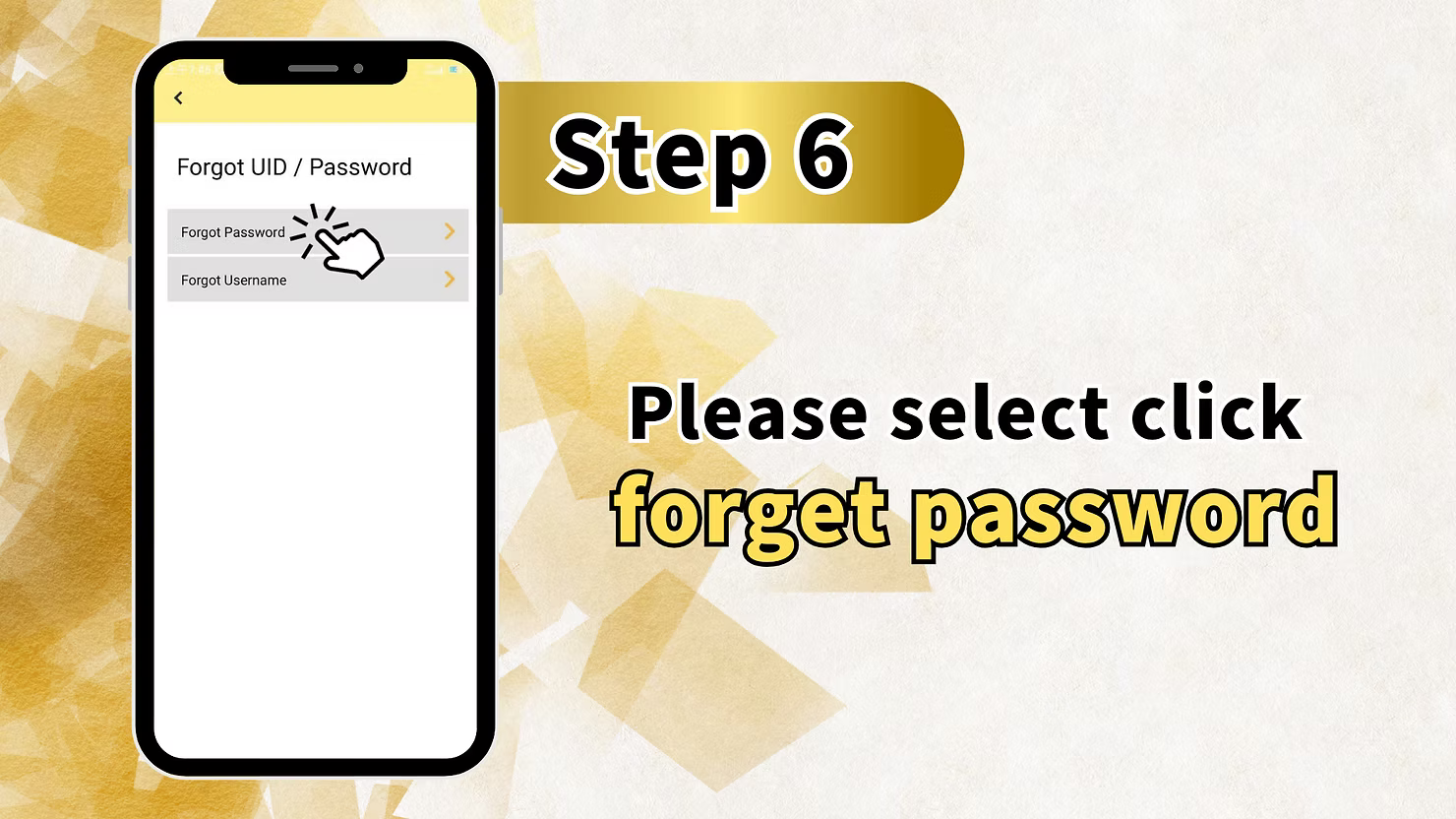
Step 1: Access the Forgot Username Option
On the LUCKYTOWNPLUS login screen, look for and click the "Forgot Username"or "Forget User" option. This may be located alongside the "Forgot Password" link.
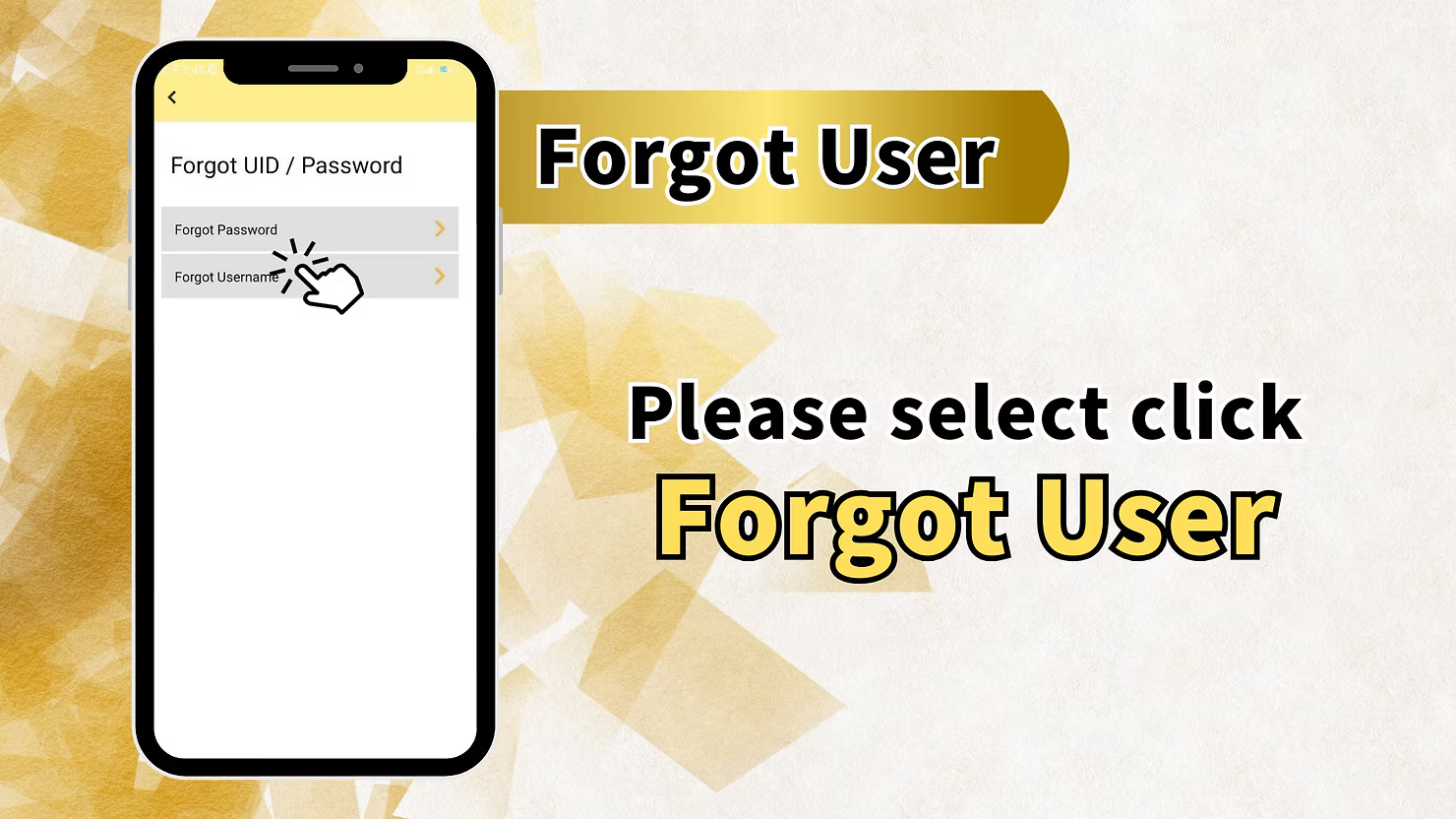
Step 2: Select "Forget User"
You may see a screen with options: "Forgot Password" and "Forgot Username" . Select "Forgot Username" or "Forget User" to proceed.
Step 3: Enter Your Registered Phone Number
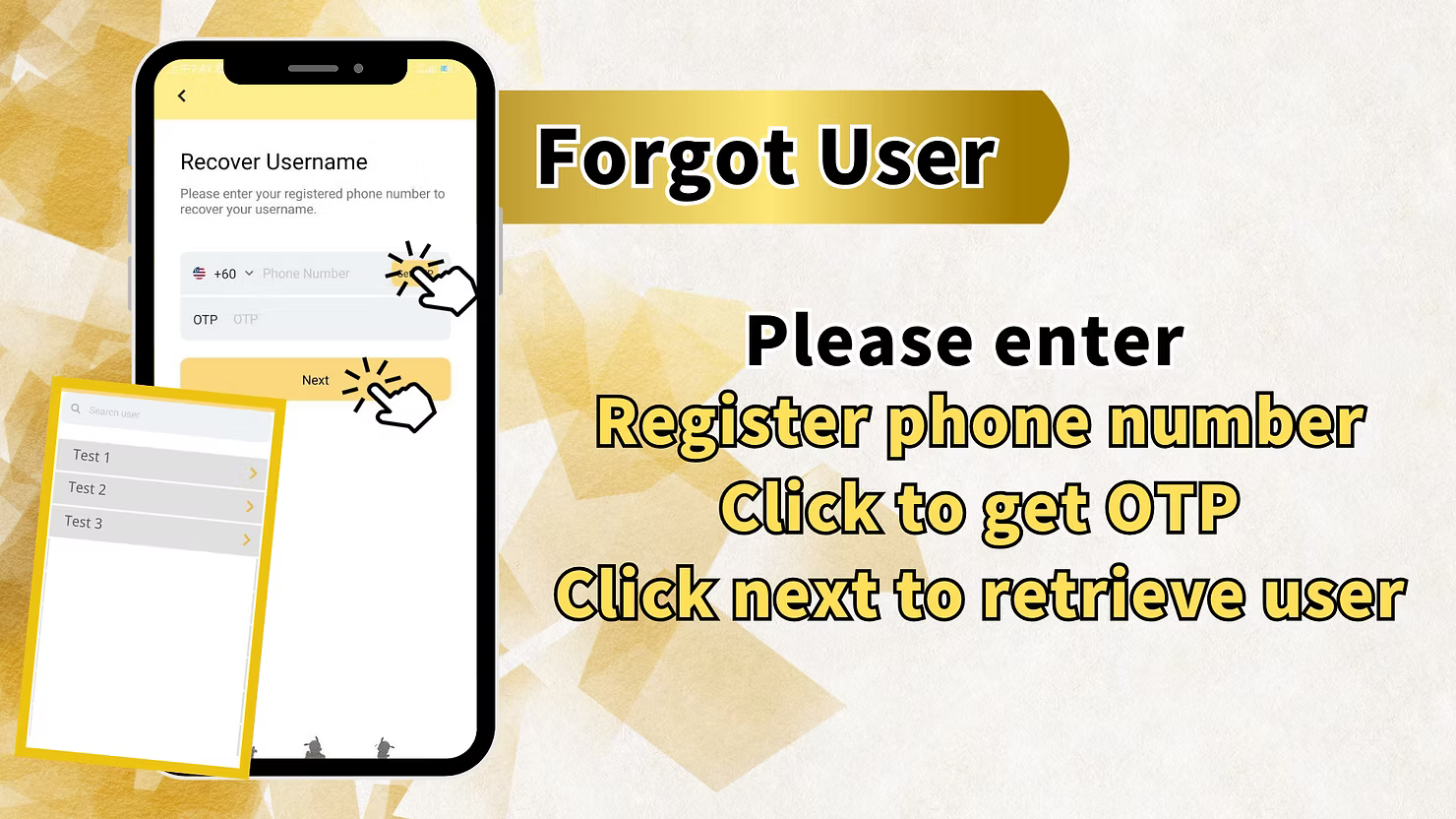
You will be taken to the "Recover Username" screen, which displays:
Recover Username Screen
"Please enter your registered phone number to recover your username." Enter your +60 Phone Number in the provided field.
Step 4: Verify with OTP
Click to request an OTP (one-time password) via SMS to your registered phone number. Enter the OTP code you receive in the designated field.
Step 5: Click Next to Retrieve Username
After entering the OTP, click "Next" . The system will display your username(s) associated with that phone number.
Username Display
You may see a list of usernames if multiple accounts are associated with the same phone number, for example:
- Test 1
- Test 2
- Test 3
Instruction Reminder
"Please enter Register phone number Click to get OTP Click next to retrieve user" – Follow this sequence to successfully recover your username.
Important Notes for Password and Username Recovery
Registered Phone Number Required
All recovery methods require access to the +60 phone number you used during registration. OTP verification ensures that only you can reset your account credentials.
OTP Security
One-time passwords (OTP) are sent via SMS to your registered phone number. Never share this code with anyone. LUCKYTOWNPLUS will never ask for your OTP outside of the official recovery process.
Password Requirements
When creating a new password, ensure it meets the platform requirements: minimum 8 characters, letters and numbers only (no spaces or special characters as per registration rules).
Multiple Usernames
If you have multiple accounts registered to the same phone number, the recovery process may display all associated usernames. Select the correct one for your needs.
Frequently Asked Questions About Password and Username Recovery
What If I Forgot Both My Username and Password?
Start with the "Forgot Username" process first. Once you retrieve your username, you can then use the "Forgot Password"process with your known username and phone number.
What If I No Longer Have Access to My Registered Phone Number?
If you no longer have access to your registered Malaysia phone number, account recovery becomes more difficult. Contact LUCKYTOWNPLUS customer service with any supporting information you have to verify your identity.
How Long Does OTP Take to Arrive?
OTP codes typically arrive within 30-60 seconds. If you don't receive a code, check that you entered the correct phone number and that your phone has signal reception. You can request a new code after 60 seconds.
Can I Change My Password Without OTP If I'm Logged In?
Yes. If you are already logged in and know your current password, you can follow the "Change Password" steps in Section 1 without OTP verification.
Is There a Limit to Recovery Attempts?
For security reasons, there may be limits on how many OTP requests or recovery attempts you can make within a certain timeframe. This helps prevent unauthorized access attempts.
What If the System Shows "User Not Found"?
If you receive a "User not found" message, double-check that you entered the correct phone number and username combination. If problems persist, contact customer service.
Why Choose LUCKYTOWNPLUS for Account Security?
LUCKYTOWNPLUS prioritizes account security with multiple recovery options and OTP verification. Whether you need to change your password regularly for security, or you've forgotten your credentials, our clear step-by-step processes ensure you can regain access quickly and safely. The use of SMS OTP verification adds an extra layer of protection, ensuring that only the registered phone holder can reset account access.
Manage Your LUCKYTOWNPLUS Account Credentials Today
Need to change your password or recover a forgotten username? Follow our comprehensive guides to reset your credentials securely using your registered Malaysia phone number. Log in now to access your account settings – or if you're locked out, start the recovery process from the login page.
Access Account Recovery