


Your transaction PIN (also called payment PIN or transfer password) is essential for financial operations on LUCKYTOWNPLUS, including withdrawals and fund transfers. LUCKYTOWNPLUS provides two ways to manage your transaction PIN: changing it when you know your current PIN, or recovering it when you've forgotten it. Both methods use OTP verification to ensure security. Follow the appropriate guide below.
Section 1: How to Change Your Transaction PIN (When You Know Your Current PIN)
Step 1: Access the "NE" Section
Log in to your LUCKYTOWNPLUS account. On the main page, locate and click the "NE" button in the bottom right corner. This opens your personal dashboard where you can manage your account settings.
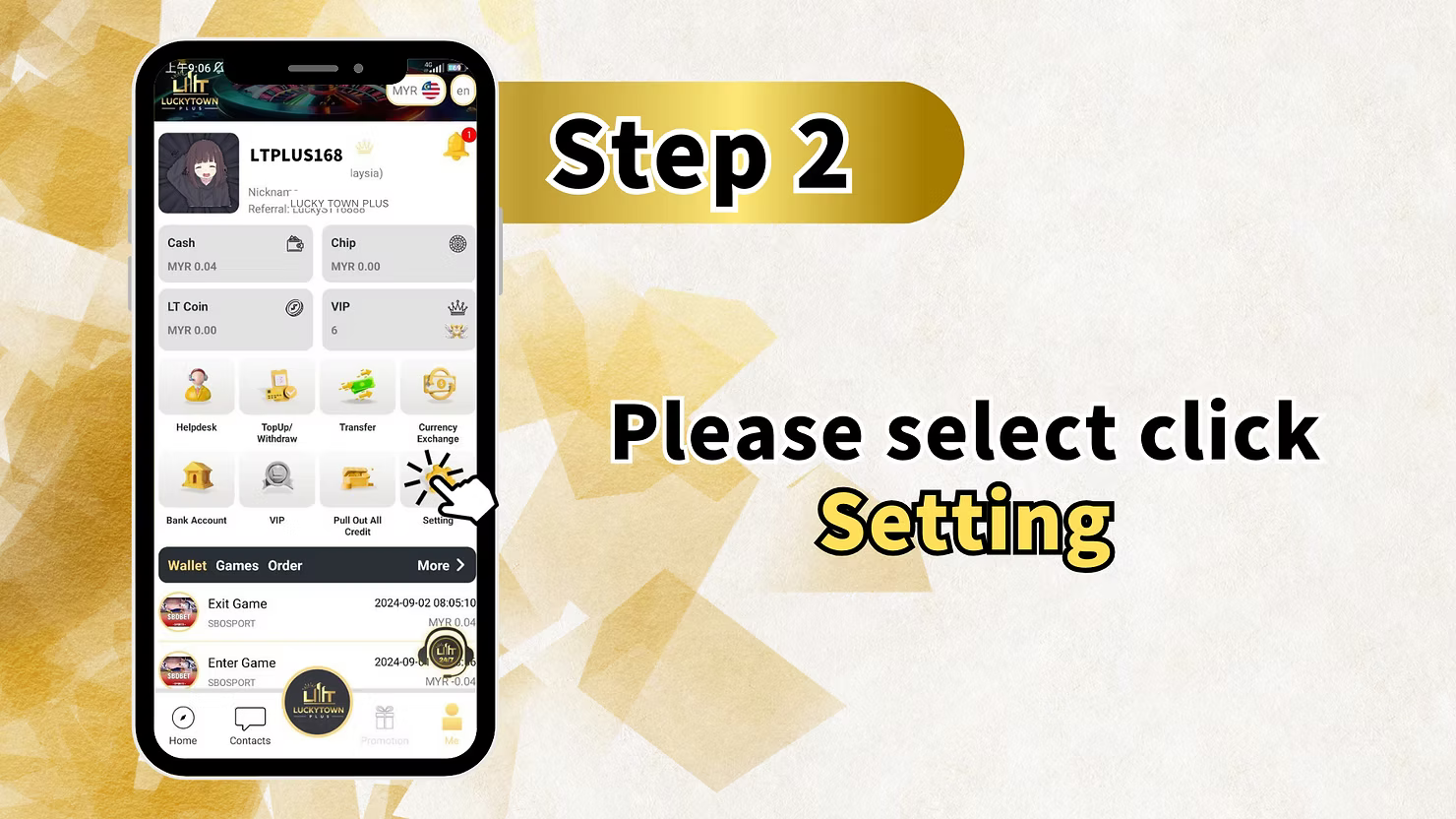
Step 2: Select "Setting"
From your dashboard, locate and click on "Setting" to access the full settings menu.
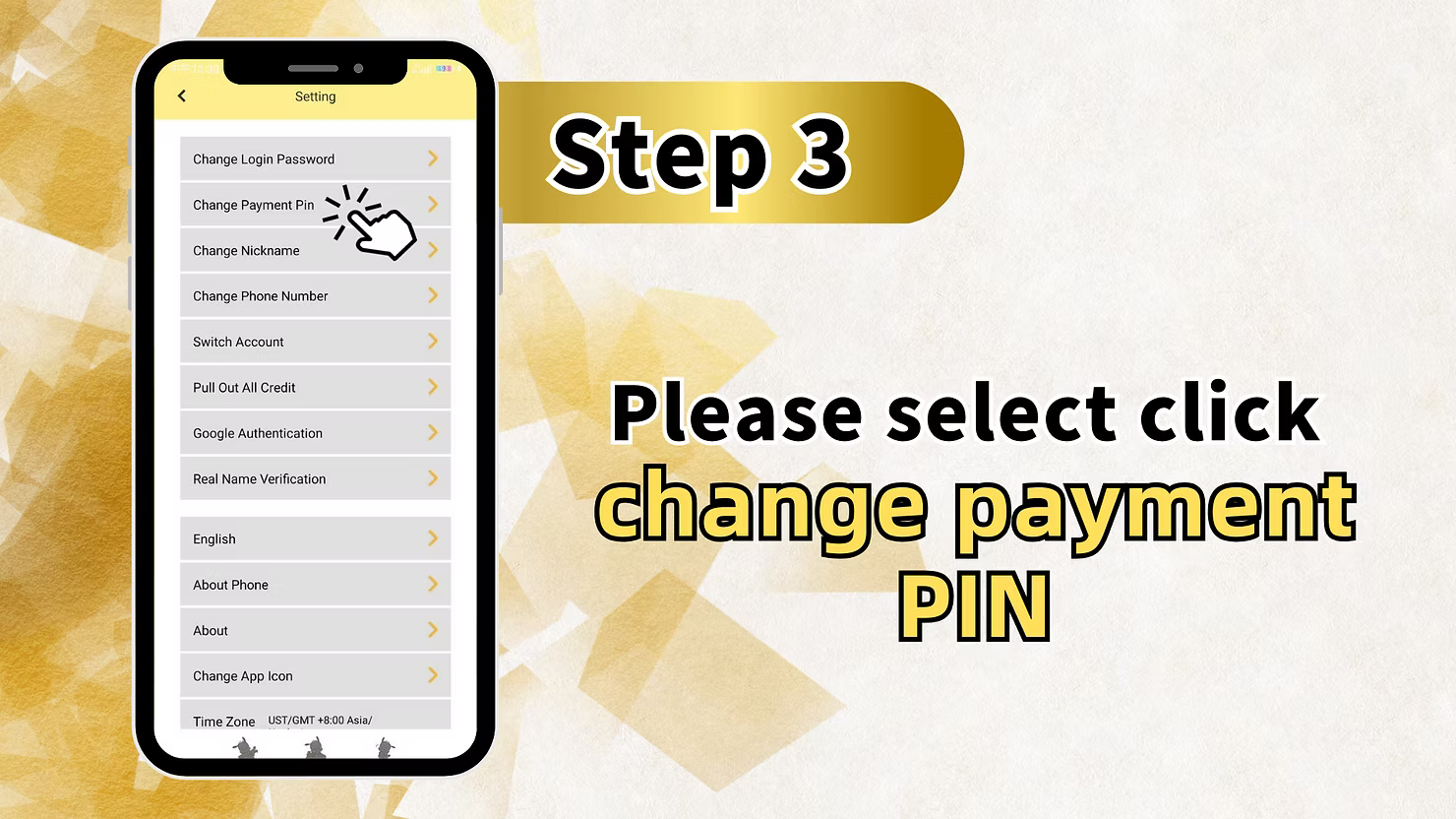
Step 3: Select "Change Payment PIN"
In the Settings menu, find and click on "Change Payment PIN" . This will open the transaction PIN change interface.
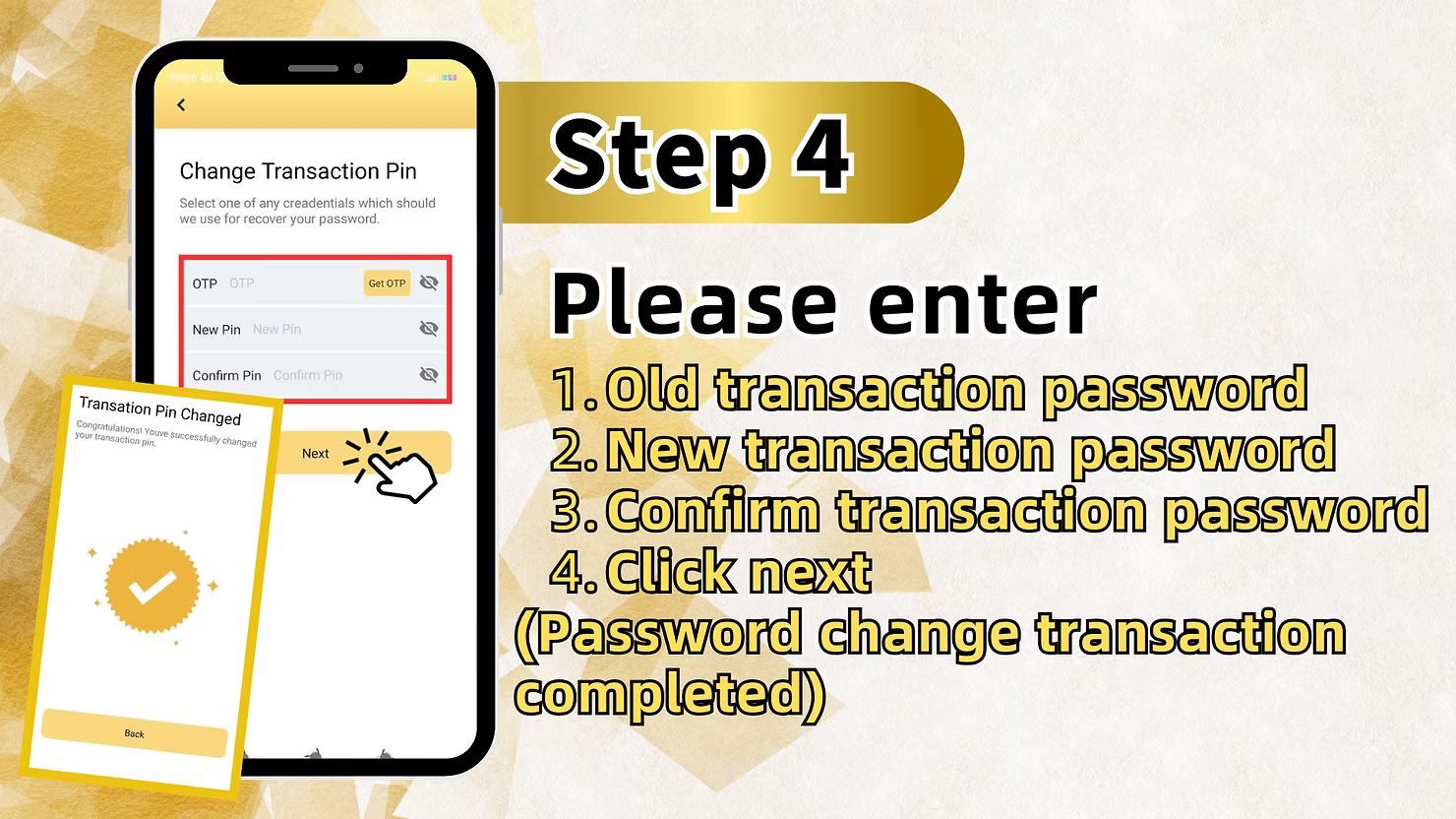
Step 4: Complete the PIN Change Process
On the Change Payment PIN screen, follow these sub-steps:
1. Click to Change Password
Select the option to begin changing your transaction PIN.
2. Enter New Password and Confirm
Enter your new 6-digit transaction PIN in the "New Pin" field. Then re-enter it in the "Confirm Pin" field to ensure accuracy.
3. Change PIN
After entering and confirming your new PIN, proceed with the change.
4. Click Next
Click the "Next" button to submit your new transaction PIN.
Success Confirmation
"Password change transaction successfully" – The system will confirm that your transaction PIN has been successfully changed.
Section 2: How to Recover a Forgotten Transaction PIN
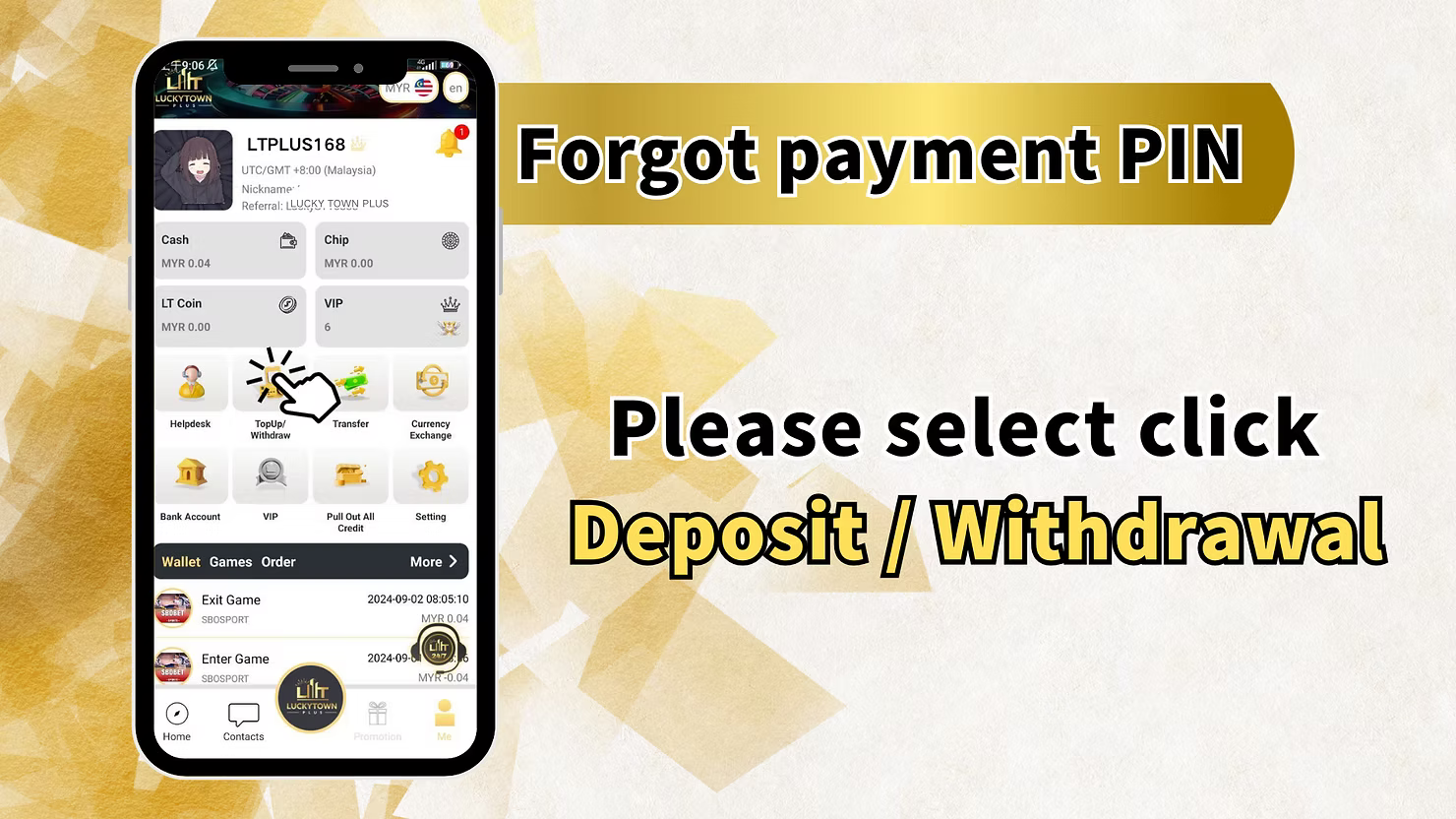
Step 1: Access "Deposit / Withdrawal"
If you have forgotten your transaction PIN, you can start the recovery process from the financial section. Log in to your account and navigate to "Deposit / Withdrawal" .
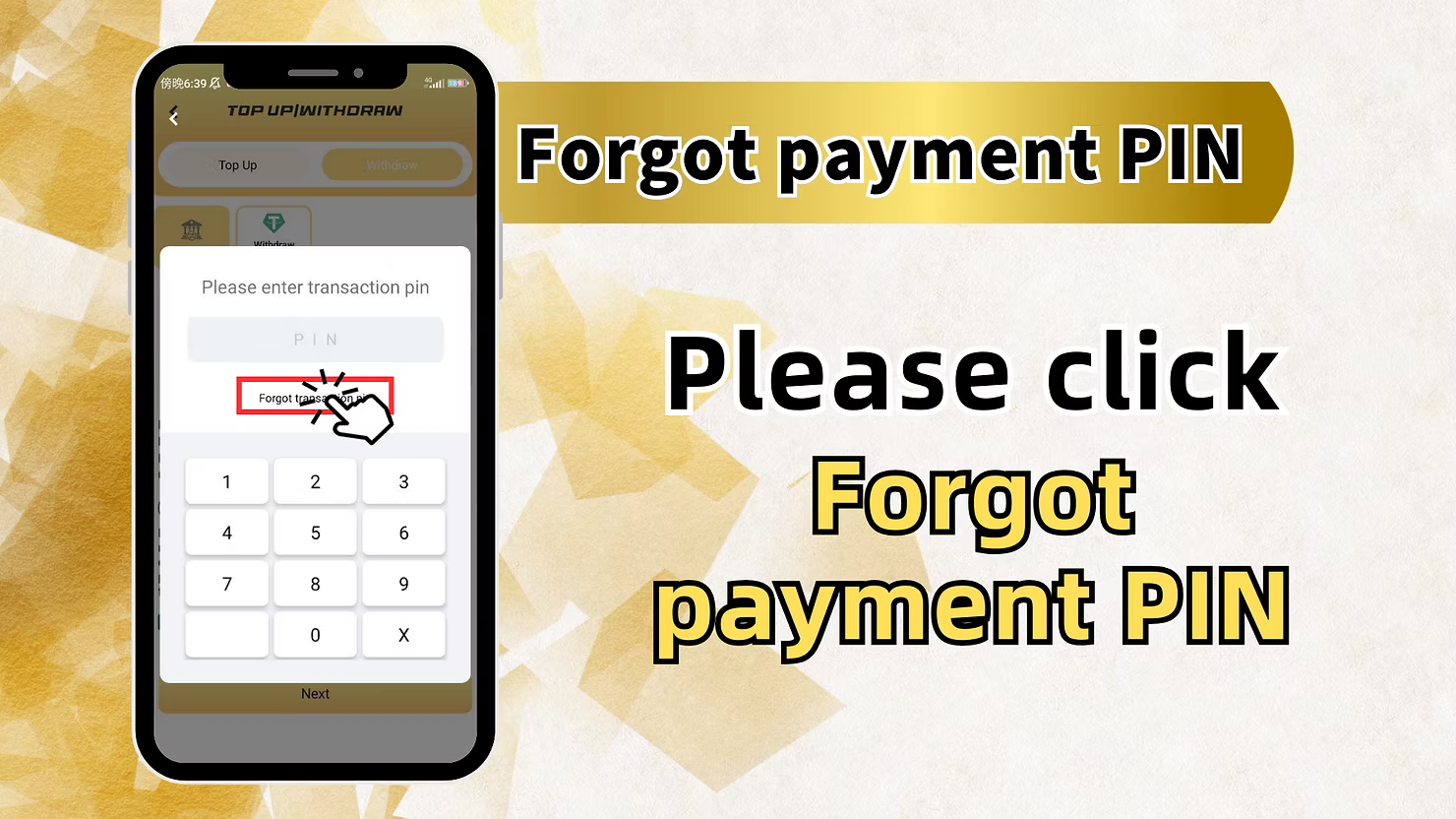
Step 2: Locate and Click "Forgot Payment PIN"
On the Deposit/Withdrawal page, look for the "Forgot payment PIN" link or button. Click this to begin the recovery process.
Alternative Access
The instructions also mention: "To withdraw money, simply click the account below" – You may also access the forgot PIN option when attempting a withdrawal.
Step 3: Click "Forget payment PIN" to Proceed
You will see a screen asking you to confirm that you want to reset your payment PIN. Click "Forget payment PIN"again to continue.
Step 4: Enter Your Registered Phone Number
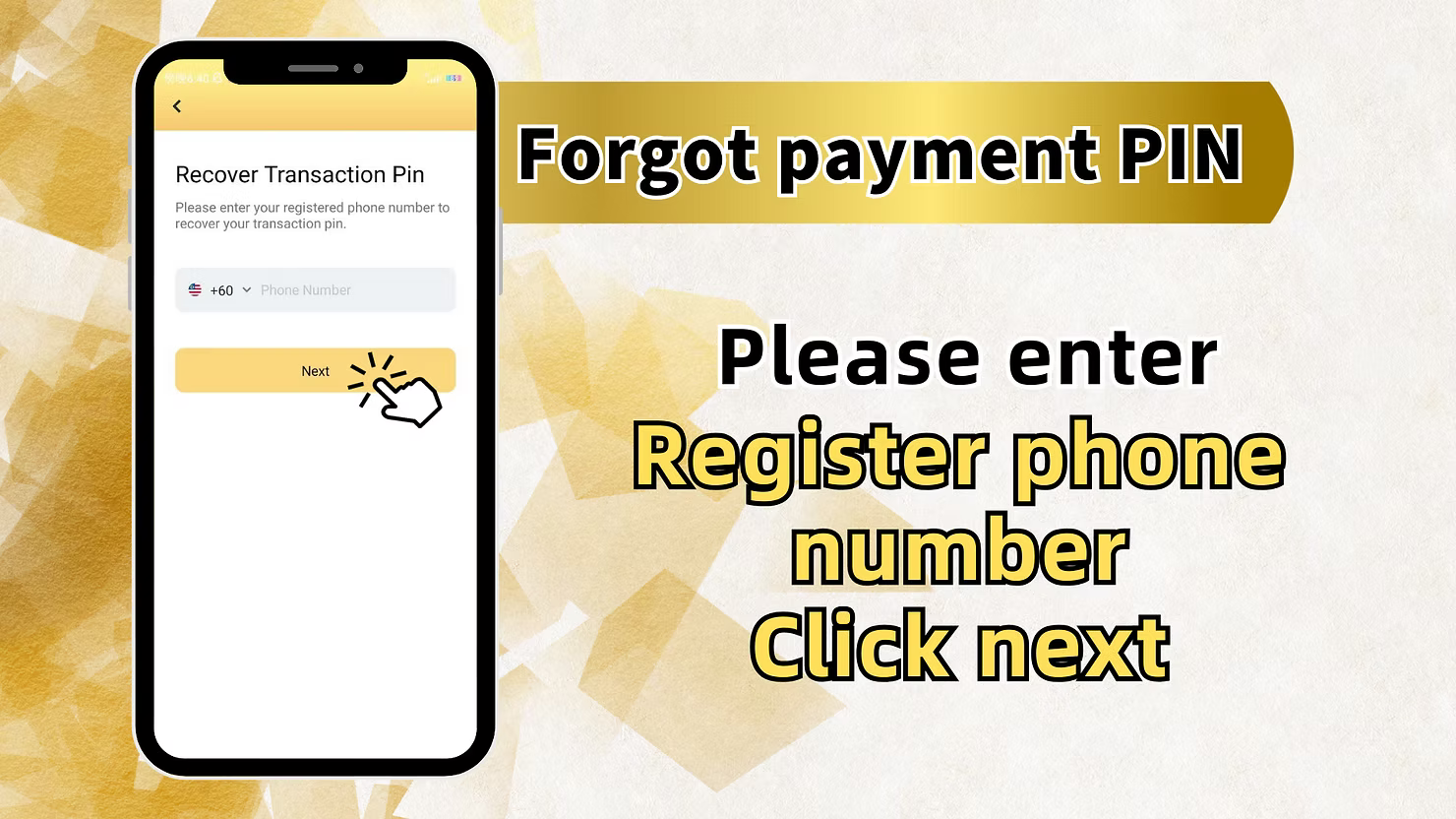
On the next screen, you will be prompted:
Phone Number Entry
"Please enter Register phone number" – Enter your +60 Malaysia phone numberthat is registered with your LUCKYTOWNPLUS account. This is required for identity verification.
Step 5: Click Next
After entering your phone number, click "Next" to proceed to OTP verification.
Step 6: Verify with OTP
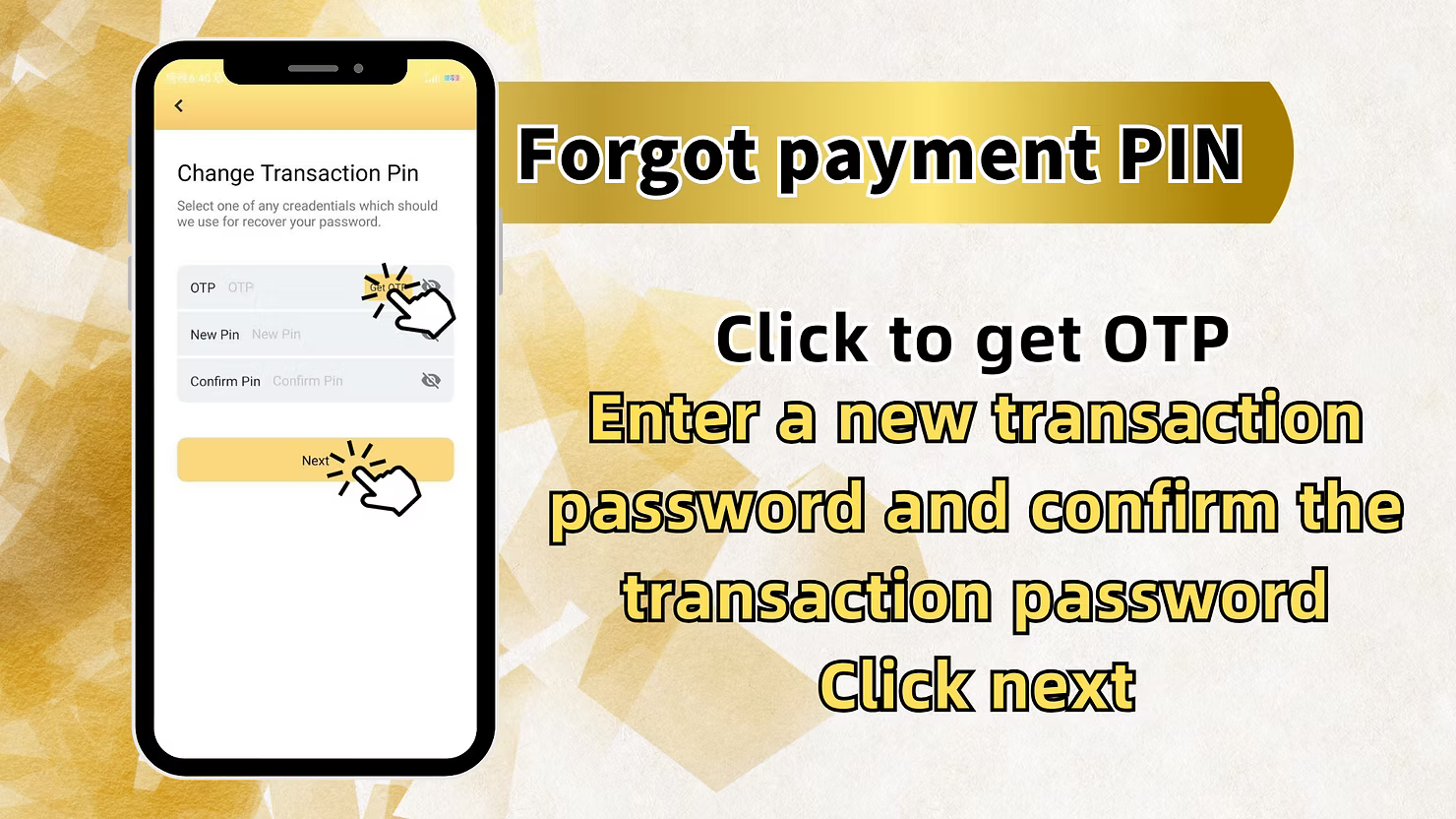
You will now see the "Change Transaction Pin" or "Forgot payment PIN" screen with OTP verification options:
Request OTP
"Click to get OTP" – Click the button to request a one-time password via SMS to your registered phone number. The code will be sent within seconds.
Enter OTP
Enter the OTP code you receive in the designated field (labeled "OTP OTP" in the example).
Enter New Transaction PIN
"Enter a new transaction password and confirm the transaction password" – Create your new 6-digit transaction PIN and enter it in the "New Pin" field.
Confirm New Transaction PIN
Re-enter your new PIN in the "Confirm Pin" field to ensure there are no typing errors.
Complete the Process
After entering OTP and your new PIN (with confirmation), click "Next" to submit your request.
Step 7: Success Confirmation
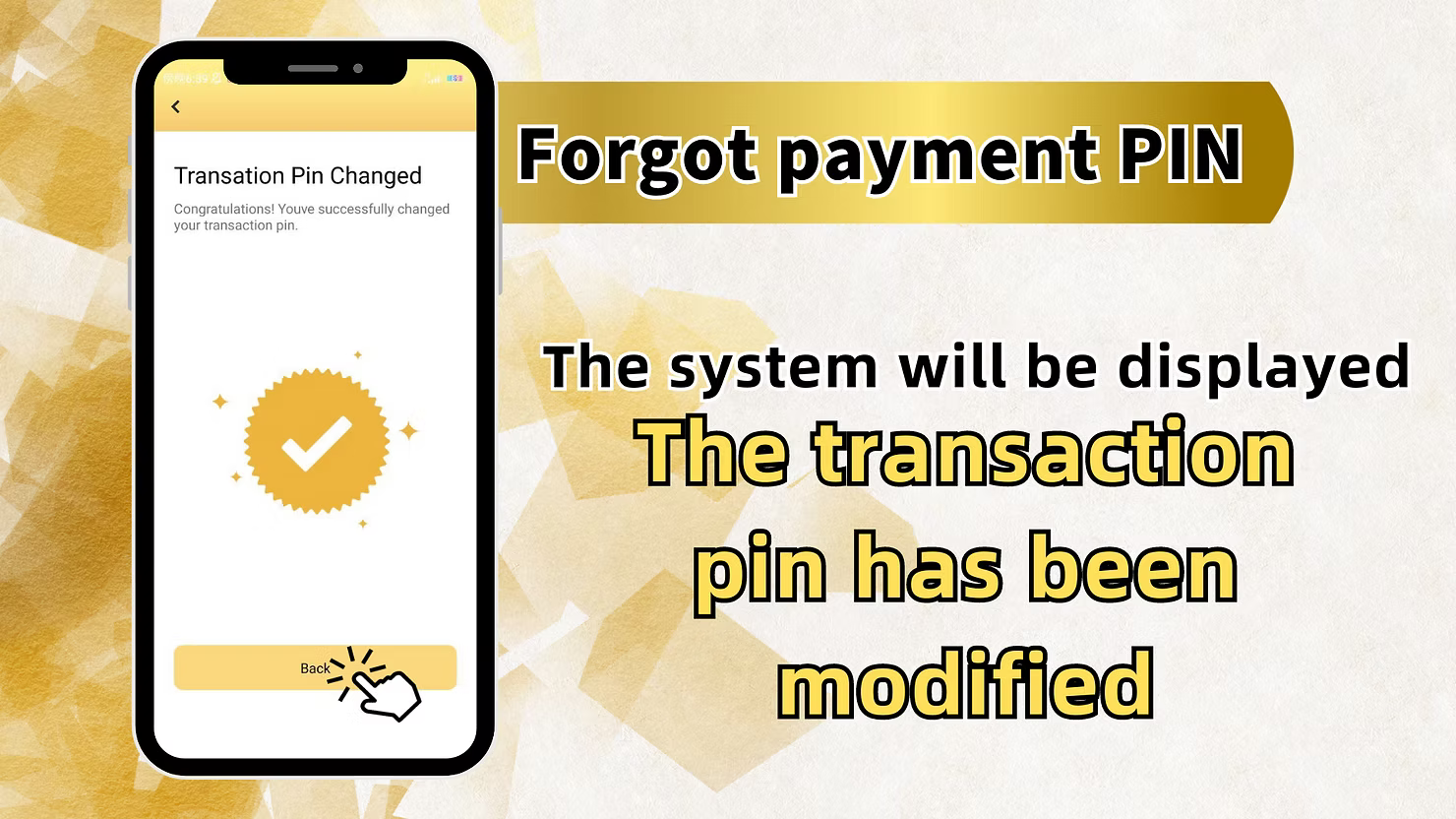
After successful verification and PIN reset, you will see a confirmation screen:
Success Message
"Translation Pin Changed Congratulations! You've successfully changed your transaction pin." – This confirms your new transaction PIN is active.
System Confirmation
"The system will be displayed The transaction pin has been modified" – Additional confirmation that your PIN change was successful.
Important Notes for Transaction PIN Management
Registered Phone Number Required
All recovery methods require access to the +60 phone number you used during registration. OTP verification ensures that only you can reset your transaction PIN.
OTP Security
One-time passwords (OTP) are sent via SMS to your registered phone number. Never share this code with anyone. LUCKYTOWNPLUS will never ask for your OTP outside of the official recovery process.
PIN Requirements
Your transaction PIN must be a 6-digit number. Choose something memorable but not easily guessable (avoid birthdates, sequential numbers, etc.).
Keep PIN Confidential
Never share your transaction PIN with anyone. LUCKYTOWNPLUS will never ask for your PIN via phone, email, or message.
Frequently Asked Questions About Transaction PIN
What Is a Transaction PIN Used For?
Your transaction PIN (also called payment PIN or transfer password) is required for financial operations including withdrawals, fund transfers, and changing account settings related to money.
What If I Forgot My Transaction PIN and Can't Access My Phone?
If you no longer have access to your registered Malaysia phone number, account recovery becomes more difficult. Contact LUCKYTOWNPLUS customer service with any supporting information you have to verify your identity.
How Long Does OTP Take to Arrive?
OTP codes typically arrive within 30-60 seconds. If you don't receive a code, check that you entered the correct phone number and that your phone has signal reception. You can request a new code after 60 seconds.
Can I Change My Transaction PIN Without OTP If I'm Logged In?
Yes. If you are already logged in and know your current PIN, you can follow the "Change Payment PIN" steps in Section 1 without OTP verification.
Is There a Limit to Recovery Attempts?
For security reasons, there may be limits on how many OTP requests or recovery attempts you can make within a certain timeframe. This helps prevent unauthorized access attempts.
What If the System Shows an Error During Recovery?
If you encounter errors during the recovery process, double-check that you entered the correct phone number and that your OTP code is correct. If problems persist, contact customer service.
Why Secure Your Transaction PIN on LUCKYTOWNPLUS?
Your transaction PIN is the key to your funds on LUCKYTOWNPLUS. Whether you're changing it regularly for security or recovering a forgotten PIN, our clear step-by-step processes with OTP verification ensure that only you can access and modify your financial credentials. LUCKYTOWNPLUS is committed to providing robust security while making account management straightforward and accessible.
Manage Your Transaction PIN on LUCKYTOWNPLUS Today
Need to change your transaction PIN or recover a forgotten one? Follow our comprehensive guides to reset your payment PIN securely using your registered Malaysia phone number. Log in now to access your account settings – or start the recovery process from the Deposit/Withdrawal page.
Manage Transaction PIN